
A growing SMB almost always ends up with the same problem: its customer data scattered across the CRM, the ERP, the e-commerce platform and two or three marketing tools, none of which really talk to each other. The result is a leadership team deciding on incomplete information, and staff manually rebuilding what a well-designed system should deliver in a few clicks.
That is exactly what customer data integration solves, but the term covers several different realities. Between a CDP, a data warehouse, reverse ETL and CRM integration, the right approach depends on your tools, your resources and the use cases you are trying to cover.
What is customer data integration?
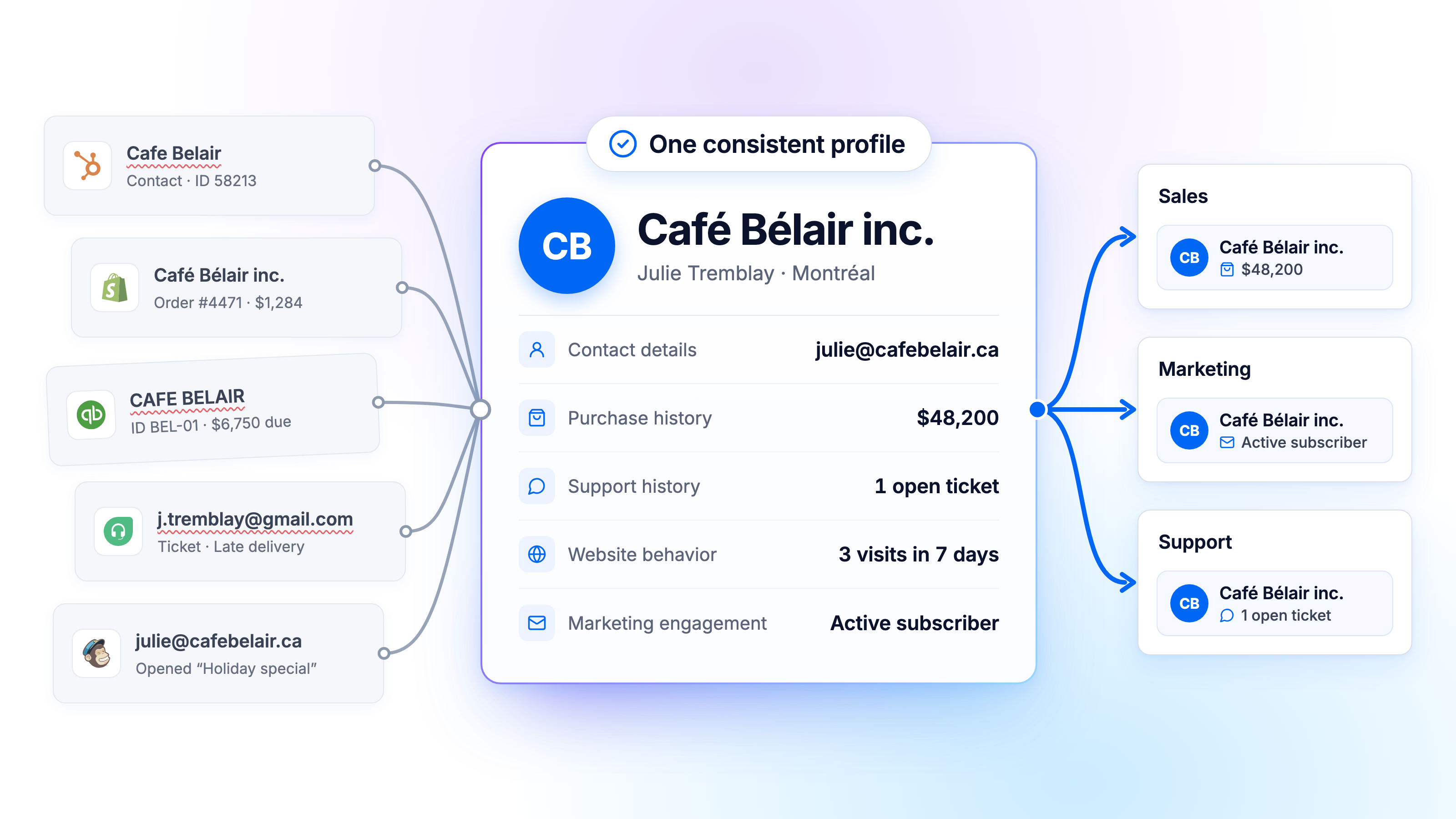
Integrating your customer data means connecting and harmonizing the information generated at every touchpoint: contact details, purchase history, support interactions, website behavior, marketing engagement. The goal is not to pile everything into one place, but to make that data consistent and usable by the teams that need it, when they need it.
In an SMB, this data typically comes from the CRM (Salesforce, HubSpot), the ERP or billing software, the e-commerce platform and the customer support tool. Each of these systems keeps its own version of the truth, with its own identifiers and its own rules.
Three concepts are often confused here. A customer data platform (or CDP) unifies customer profiles, most often for marketing and activation, though some also cover analytics and governance. A data warehouse centralizes the whole company's data, not just customer profiles. The customer 360 view is not a tool: it is the outcome of well-executed integration, whatever architecture you choose.
Why does customer data stay fragmented in an SMB?
Fragmentation rarely comes from a lack of will. It comes from how tools pile up as the company grows. Each new piece of software solves one problem but creates a new isolated data source. Without a data integration strategy defined from the start, these connections multiply ad hoc, usually as point-to-point integrations cobbled together by the most technical person on the team.
The second, more insidious factor is formats and identifiers. The same customer may carry a different ID in the CRM, the ERP and the e-commerce platform, with an email spelled differently or a company registered under two legal names. Without a reconciliation rule, these gaps pile up silently.
The consequences show up first in operations: manual re-entry, reports that don't match from one department to the next, decisions made on only part of the available information. They also show up in compliance: in Quebec, Law 25 requires governing personal information, including access, roles and retention rules. The more that information is copied from system to system, the harder it becomes to control who can see it, apply a consistent retention rule and answer requests about it.
Which solutions can you use to integrate customer data?
There is no single method, but four families of approaches, each answering a different need. They range from simple point-to-point connections to full data integration solutions run for you.
Direct connections between applications
Through native APIs or no-code tools like Zapier, these are simple to set up and are often an SMB's first step. The problem appears as their number grows: each point-to-point integration becomes one more dependency to maintain, and the whole thing ends up looking like a technical plate of spaghetti nobody fully controls.
ETL or ELT into a data warehouse
This approach answers a different need: centralizing all the data for analysis, beyond customer data alone. It is the right path for cross-referencing customer data with, say, project profitability or operating costs. The ETL vs ELT choice mostly comes down to where the transformation happens.
The customer data platform (CDP)
A CDP targets the unification of customer profiles to activate them in marketing campaigns or personalization scenarios. Useful when the main use case is marketing, it does not replace a warehouse if the company also needs broader financial or operational analytics.
Reverse ETL
Reverse ETL closes the loop: once the data is consolidated, it pushes it back to the business tools (CRM, support, marketing) so it gets used where teams actually work, rather than sitting in a warehouse nobody opens. Some managed platforms handle the configuration, monitoring and maintenance of these syncs, with no script to maintain in-house.

Best practices for successful customer data integration
Whatever approach you pick, a few practices make the difference between a project that lasts and one that collapses after six months.
Start from use cases, not tools
A company that picks its technology first, then looks for what it can do, regularly ends up with an oversized solution. Better to start from a concrete question, like spotting active customers nobody has contacted in six months, then work back to the architecture that answers it.
Define a source of truth per data type
Not one single source for the whole company. The CRM is usually authoritative on contact details and commercial status, the ERP on billing, the e-commerce platform on order history. Pretending one system can arbitrate everything almost always leads to unresolved conflicts.
Standardize formats, identifiers and quality rules
A single date format, a naming convention for company accounts, a consistent customer ID across systems: low-visibility work, but probably the most decisive for reliability. Cleansing, deduplication and validation follow immediately, not as a one-off at project start but as a check repeated at every sync. A clean base today turns dirty within months without ongoing monitoring.
Automate, monitor, document
Automating the flows keeps this work off the shoulders of one person checking everything by hand. Alerts on sync failures let you react before the error spreads into leadership reports. Governance, finally, is designed in from the start: document who can access which data, restrict access to real need, and make sure Law 25 requirements on consent and retention are met from the first connection between systems, not at audit time.
How to build and use a 360 customer view
Building a customer 360 view means unifying data from the CRM, transactions, support and marketing into one coherent whole, able to answer a simple but rarely easy question: what do we actually know about this customer, across all systems?
Identity reconciliation, the real obstacle
The difficulty is not the grouping itself. The same customer may appear in different variants across systems: a work email in the CRM, a personal one in the online store, a slightly different company name in the ERP. Without clear rules (matching on email domain, account number, or a combination of criteria), unifying customer data produces a pile of duplicate profiles rather than a reliable source.
Make the view usable where the work happens
In sales, a rep should see the full history before a call rather than digging through three tools. In marketing, segments should reflect real customer behavior, if only to avoid sending a promotion to someone with an open complaint. In support, an agent should know the purchase history without having to ask. That is exactly the role of reverse ETL mentioned above: pushing this unified view back to the tools teams already use.
Take an SMB that sells online and handles part of its accounts by phone: orders in the e-commerce platform, commercial exchanges in the CRM, support tickets elsewhere. Once these three sources are reconciled, the team sees at a glance that a customer opened a ticket the week before a cancelled order, a correlation invisible as long as the data stays siloed.
CRM integration: Salesforce, HubSpot and other platforms
The CRM holds a special place, because it is almost always the first system sales teams open. A poorly thought-out CRM integration ends up hurting adoption of the tool itself.
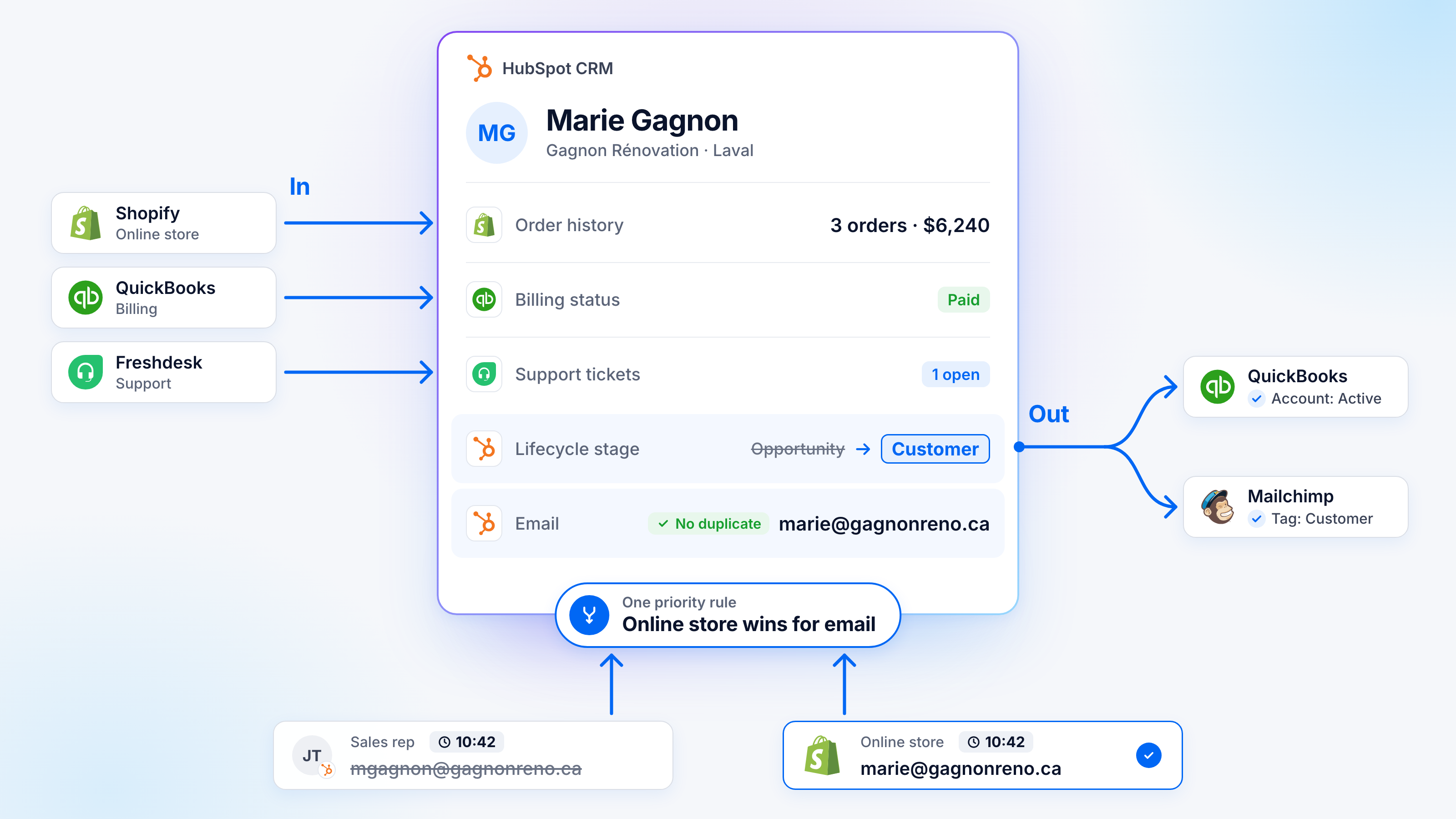
The first question to settle is which data should flow into the CRM: order history, billing status, open support tickets, all useful to a rep without opening another tool. The second, often overlooked, is which data should flow out: a change of commercial status should reflect automatically in billing or the marketing platform, with no re-entry.
The real risk sits in handling update conflicts. What happens when a rep edits an email at the same moment the customer changes it on the online store? Without a clear priority rule between sources, these conflicts create duplicate contacts that erode teams' trust in the system, to the point that some fall back on parallel spreadsheets.
Which solution should an SMB choose?
Once the technical approach is clear, the organizational question remains: who will build and operate this integration?
Building integration in-house offers full control but requires hiring or training technical staff able to maintain data pipelines over time, a burden many SMBs and mid-market companies cannot justify for a team of two or three.
A self-service tool or platform lowers the initial technical barrier but leaves the company responsible for configuring, monitoring and fixing the flows, a role that still demands skills the internal team doesn't always have.
A managed platform or service takes on both the technology and its day-to-day operation, which suits companies that want reliable results without building a data team in-house. That is the approach BEEM favors: platform and human support are part of the same engagement.
The right choice mostly comes down to four criteria: total cost (license plus maintenance time), the technical resources actually available in-house, the complexity of the current application landscape, and the solution's ability to grow with new tools.
An action plan to start integrating your customer data
Before choosing a tool, map your existing data sources precisely and identify who, in the company, owns each one. This step, often skipped out of impatience, avoids most of the nasty surprises that surface later.
Then pick a first high-value use case rather than aiming for full integration from day one. A well-chosen case, like showing an account's purchase history and open tickets inside the CRM, quickly proves concrete value and justifies the rest of the project. The choice of architecture and level of support (in-house, self-service or managed) follows from there, not before.
Starting with a limited scope lowers the risk of failure and lets you adjust the method before extending it. And defining success metrics from the start (time saved consolidating reports, fewer billing errors, support response time) tells you objectively whether the project delivered what it promised.
Good integration must stay understandable and maintainable when the team or the tools change. That is the most common mistake seen in otherwise well-run companies: they invest in the technology but document neither the sync rules, nor the responsibilities, nor the exceptions. The day a key person leaves or a CRM is replaced, everything has to be rebuilt.
Recognize your situation in several of these problems? See how BEEM can unify your customer data and take on your customer data integration without tying up an internal technical team.
