
Your team is already using AI, often in several tools at once, each one seeing a different slice of the business. The question is no longer whether to use it. It is where your data goes when you do, who decides what the AI can see, and whether the answers agree with each other. AI integration is the way a company connects AI to its data: which systems the AI reads, where the data travels, who controls access, and how answers stay consistent from one tool to the next.
There are three common ways to do it. This guide compares them on the questions a leadership team actually asks, and explains why only one of them keeps confidential data inside your own environment.
The problem with ungoverned AI in the enterprise
Most companies never chose how to integrate AI. They ended up with an integration by accident. The accounting package added an assistant, then the CRM added another, and someone in operations pasted a sales export into a public chat window to get a summary before a meeting. Each step makes sense on its own. Together they create three problems that surface in the same place, the management meeting.
The first is that each assistant only sees the system it lives in. The CRM's AI answers from bookings while the accounting AI answers from recognized revenue, and the two never match, so the meeting goes back to the spreadsheet. The second is that data leaves by the side door: a copy and paste into a public tool sends customer names, margins or payroll to a provider nobody reviewed, with no record of what went out. The third is that access rules exist nowhere in particular. Every tool has its own permissions, set by whoever installed it, so a simple question like "who can ask the AI about salaries?" has no single answer.
Governed AI adoption is the opposite: one clean source of data, one set of access rules, and a clear record of where the data goes. It depends far less on which model you pick than on the architecture you put underneath it.
Three ways to integrate AI into your business
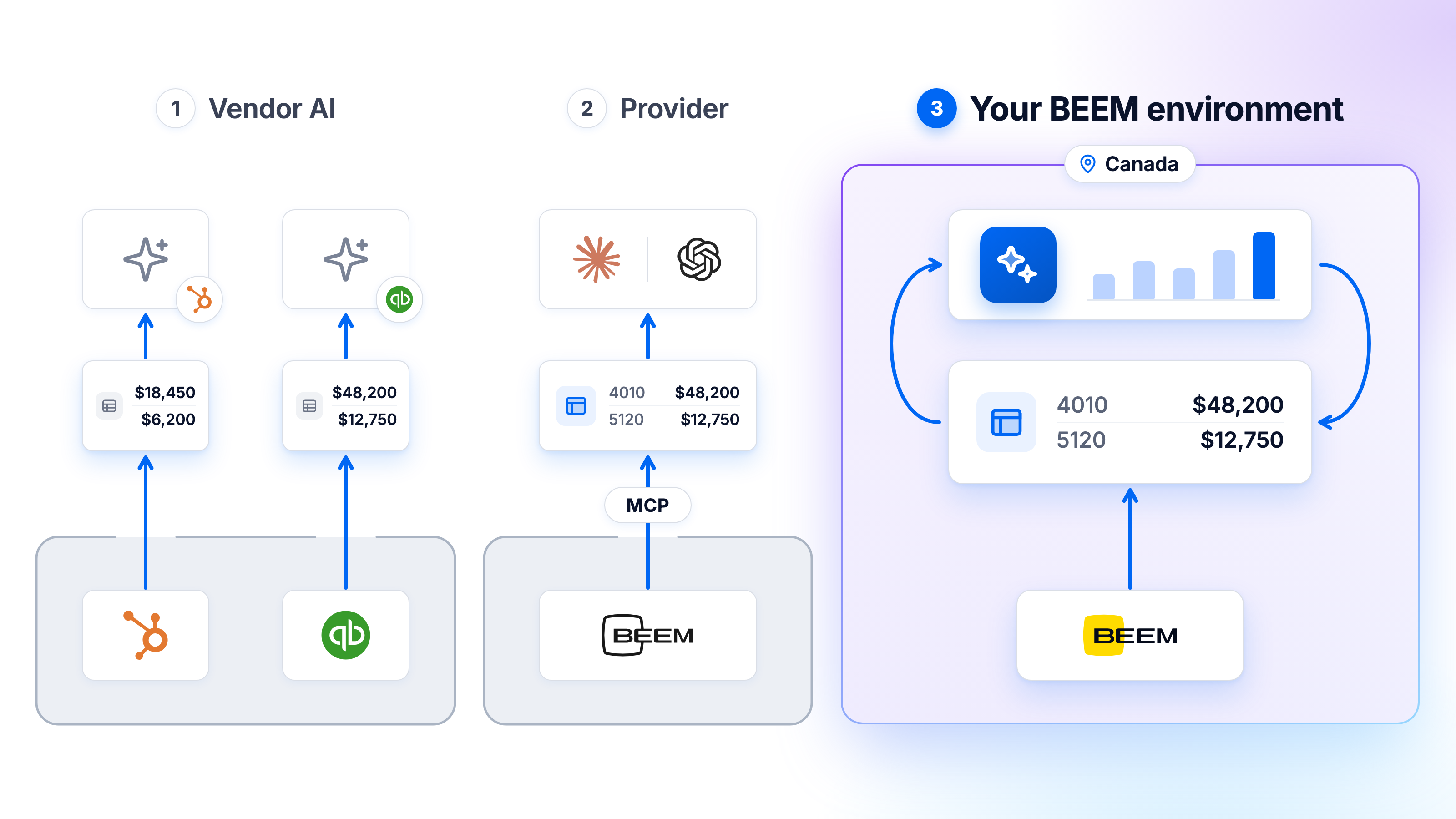
AI connected directly to your source systems
This is the model most companies have today without having picked it. Each business application ships its own AI, or someone connects a chat assistant to each system one at a time. It works well for tasks that stay inside one tool, like drafting an email in the CRM or categorizing a transaction in the accounting software.
It falls apart as soon as a question crosses two systems, which describes most of what a leader wants to know. Knowing which clients are profitable takes billing, time and cost data together, and no single application holds all three. As for where your data goes, it goes to every vendor's AI, each one under its own terms, and each one is a separate contract to review.
Verdict: useful for quick tasks inside one tool, unreliable for decisions that span the business.
Claude or ChatGPT connected to BEEM via MCP
MCP, the Model Context Protocol, is an open standard that lets an AI assistant connect to a data source through a defined set of tools. The BEEM MCP Server connects Claude, GitHub Copilot, ChatGPT and other MCP-compatible assistants to your BEEM workspace with a single URL and your existing login.
The assistant stops guessing across silos and works from the connected, cleaned data in BEEM through 56 tools. It can browse datasets, run a query, check whether last night's sync succeeded or set up a data quality test. Permissions follow each person's BEEM account, so the assistant only sees what that person is already allowed to see.
One point is worth stating plainly. The assistant itself runs at its provider, so the rows it retrieves to answer a question are sent to that provider, under the agreement you have with them.
Verdict: a strong fit for teams that already work in one of these assistants and want it to use the right numbers. For your most confidential data, the third model is the safer choice.
AI deployed inside your BEEM environment
Here the AI comes to the data instead of the data going to the AI. BEEM's AI assistant, AI Insights, and AI Dashboards run on AWS Bedrock inside your dedicated BEEM environment, in AWS's Canadian region. Your data does not leave that environment to produce an answer.
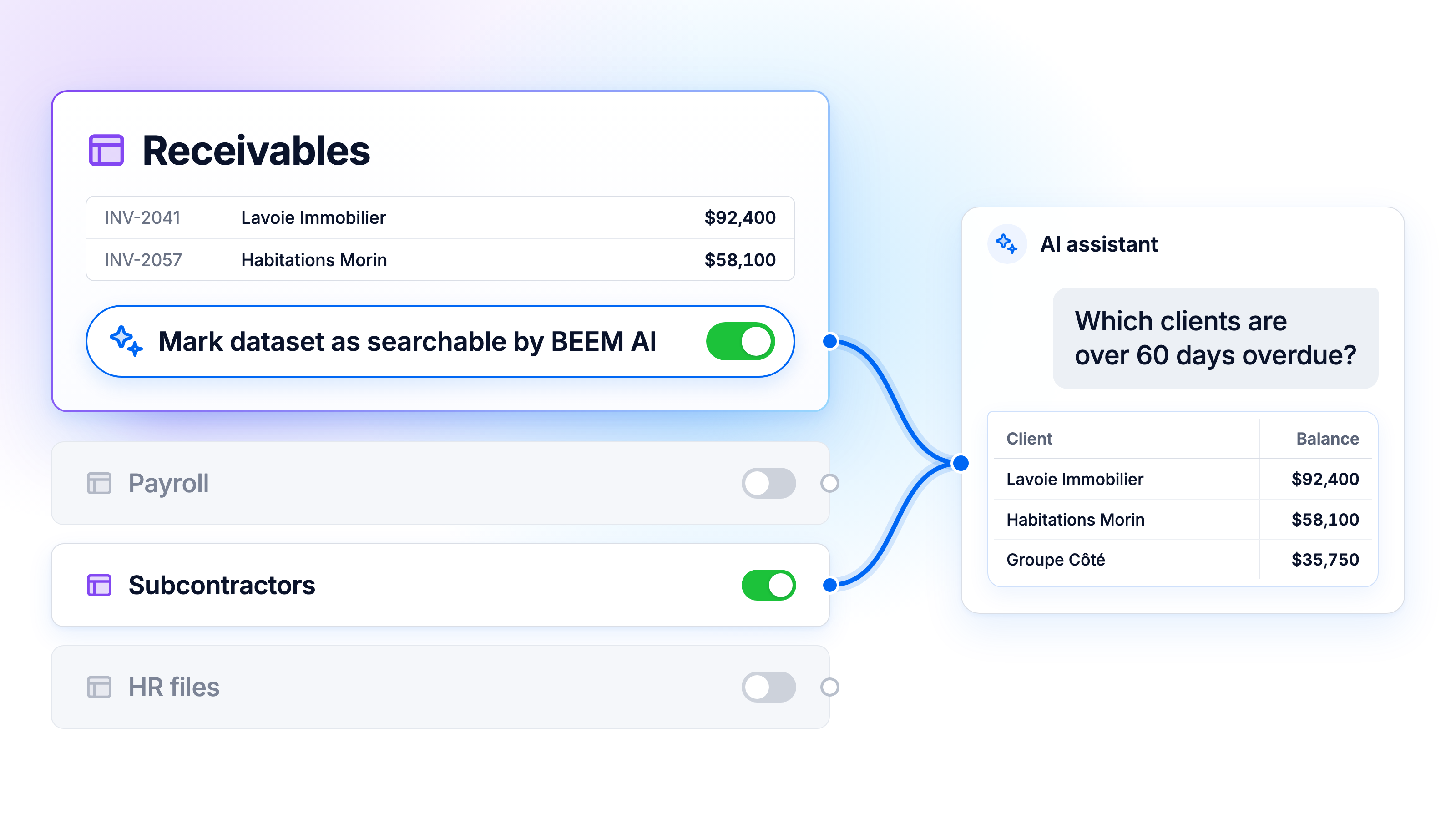
The assistant answers plain-language questions by writing and running the query on your datasets, and it shows the SQL to anyone who wants to check its work. AI Dashboards build a complete dashboard from a one-sentence description, wired to your live data. Both reach only the datasets you have enabled for AI, both respect workspace isolation, and every question is recorded in the Monitor audit trail.
Verdict: the model to choose for anything confidential, such as financial statements, payroll, client files or HR data. Many companies run it alongside MCP, keeping the assistant of their choice for everyday questions and the in-platform AI for sensitive data.
Switch AI models without rebuilding your integration
AI models improve every few months, and the one you choose today probably won't be the best one in two years. An AI integration that ties your data and business rules to a single model means starting over every time something better comes out. That is what vendor lock-in looks like with AI, and it is expensive precisely because the data work is the slow part.
BEEM keeps the two layers apart. Your connections, cleaned tables, definitions of revenue and margin, permissions and audit trail all live in the platform, and none of it is written into a model. The model itself is a replaceable part. BEEM's AI runs on AWS Bedrock, which offers several model families, including Anthropic's Claude, Mistral and Cohere, with new models added as they are released. When a better one becomes available, the model underneath can change while your datasets, dashboards and access rules stay exactly where they are.
The assistant is your choice too. Because MCP is an open standard, the team that prefers Claude and the team that prefers Copilot can both work from the same governed data, and switching assistants later doesn't mean moving anything. Your data foundation gets built once, and the part that changes fastest can change without touching it.

Your data inside BEEM's AI infrastructure: what changes
Most of the hesitation around AI comes down to three questions. Here is how each one plays out when the AI runs inside BEEM's AI infrastructure rather than at an outside provider.
Is your data used to train the AI?
No. BEEM's AI runs on AWS Bedrock inside your dedicated environment, and Bedrock does not use your prompts or your data to train the underlying models. The AI reads your data to answer a question, and the answer stays with you.
Where does your data actually live?
In a dedicated AWS environment in Canada, in the ca-central-1 region. The AI runs inside that same environment, so answering a question doesn't send your data anywhere else. BEEM follows SOC2 processes, is PIPEDA and GDPR compliant, and has had zero customer data breaches.
Who controls what the AI can see?
You do, one dataset at a time. The AI assistant only reaches the datasets you have explicitly enabled for it, so receivables can be in scope while payroll stays out. On top of that, people only see the workspaces they are invited to, roles are set per workspace (Organization Admin, Editor, Viewer), and every question is logged in Monitor.
Why BEEM instead of another AI platform
Most self-service AI platforms sell you a tool: it's on you to run it, secure it, and train your team to use it properly. BEEM takes a different approach. Governance is built into the platform from day one, with one warehouse for your connected data, access rules set at the workspace and dataset level, and AI that runs inside your environment, so keeping your data secure isn't a box you have to configure yourself. When you want a hand, the team behind BEEM is available separately to set up the connections, activate each dataset and follow the results, while you keep control over what the AI can see. You don't need to become an AI specialist to get a secure deployment. For a mid-market company without the resources to build an internal data team, that's often what separates an AI project that stays a one-off experiment from one that delivers reliable decisions, year after year.
This setup isn't a generic layer bolted onto any industry. It adapts to the realities of your business, whether that's tracking projects and managing subcontractors in construction, consolidating portfolios and rental reporting in real estate and hospitality, keeping the numbers accurate and compliant in finance and accounting, or unifying sales and inventory data in e-commerce and retail. In every case, the same principle applies: your data stays inside your environment, your business rules are centralized, and AI only sees what you've explicitly turned on. Our AI solutions make your data ready for that kind of project, whatever your starting point. The goal stays the same no matter the industry: giving you a reliable view of your business without having to hire a technical team to get it.
Want to see AI working on your own numbers without giving up control of them? Book a BEEM demo and see the AI assistant and AI Dashboards on your real data, in an environment that stays yours.
