Solutions/Artificial intelligence/AI in Construction

AI in construction that answers from your own job costs

BEEM brings AI in construction to the job cost already in Maestro, Procore and your accounting system. Your dashboards and AI assistant read the same numbers, so you catch a slipping job while there’s still time to act.

First dashboards in as little as 2 weeks

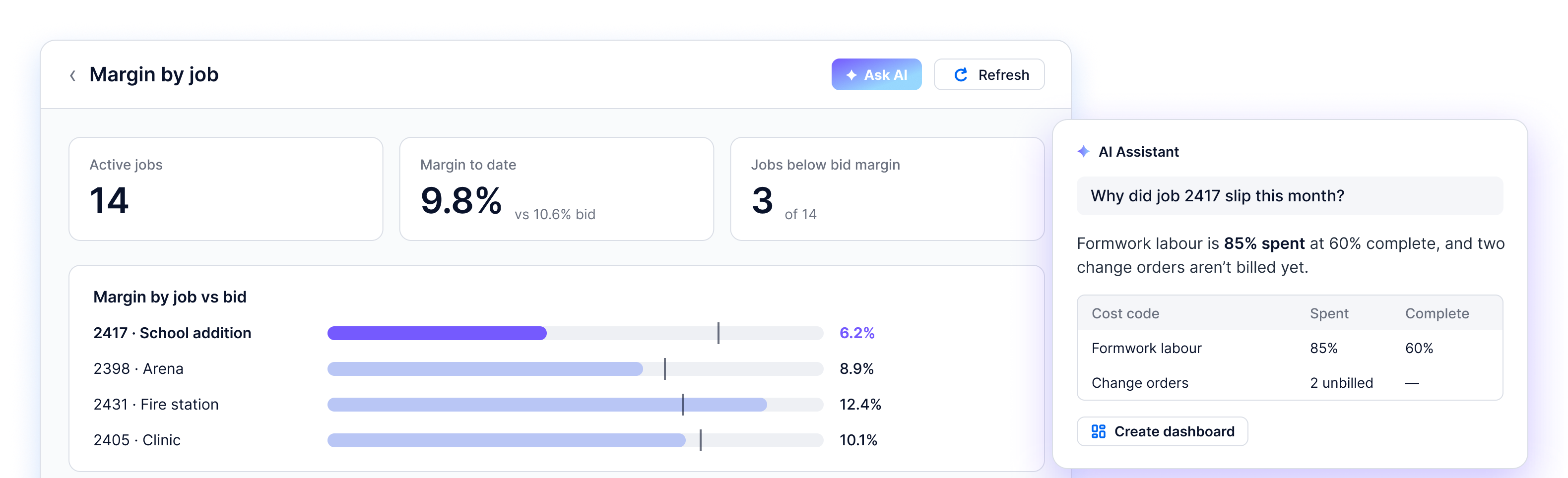
BEEM AI Dashboard showing margin by job, with the AI Assistant explaining why job 2417 slipped this month

Construction teams already working with BEEM

The problem

How old is your WIP schedule by the time anyone reads it?

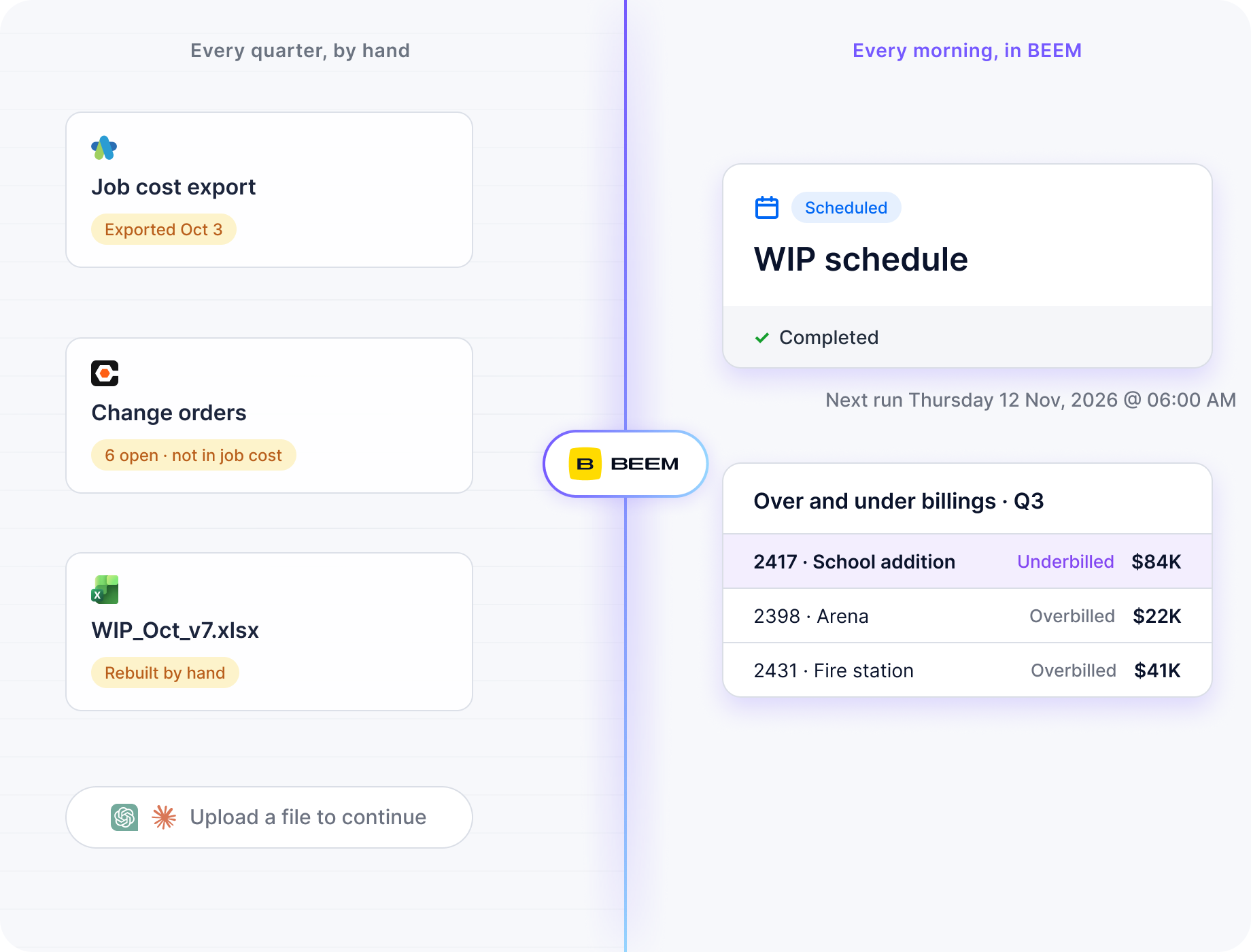
A mid-size contractor’s numbers sit in systems that never meet: job cost in Maestro, change orders in Procore, the WIP schedule in Excel.

So the controller rebuilds the WIP by hand every quarter, and mid-month a job looks under budget because the bills haven’t arrived. As FOUNDATION Software notes, a report of actuals can show $30,000 spent and $50,000 left when that money is already committed. Pasting exports into ChatGPT or Claude means a new upload for every question.

Job cost, change order and WIP exports rebuilt by hand every quarter, compared with a WIP schedule dataset and over and under billings refreshed every morning in BEEM

How it works

How BEEM’s AI for construction works

For a contractor, AI in construction is only as useful as the job cost it reads. BEEM is a managed data platform built on that idea: one warehouse that joins your systems, dashboards hosted on it, and an AI assistant that answers from it.

BEEM runs the infrastructure, and BEEM’s data team is available when you’d rather hand off a build or a change.

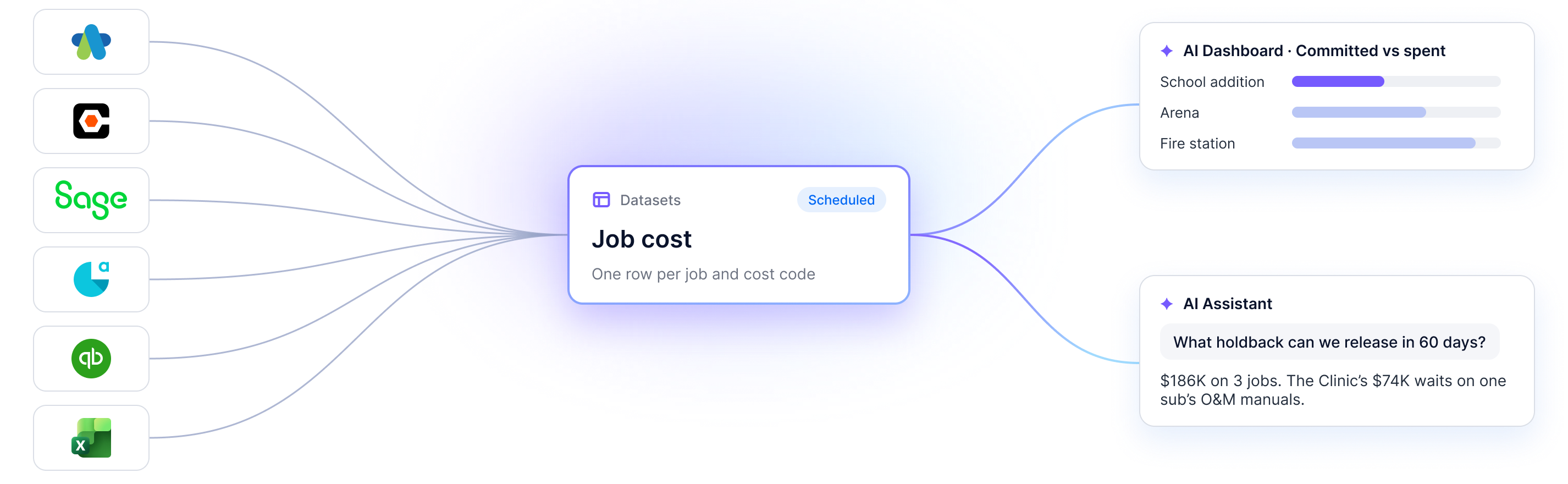
Maestro, Procore, Sage, Acomba, QuickBooks and Excel feed one Job cost dataset in BEEM, which powers an AI Dashboard and the AI Assistant
01

One warehouse that joins every job

Every system you connect syncs into one managed warehouse. Datasets join its job cost, change orders and billings by job and cost code, and refresh on your schedule.

02

Dashboards hosted in BEEM, every published version kept

Your dashboards run inside BEEM with no servers or deployments to manage. Describe a change and publish it, and Version history keeps every published version so you can revert.

03

Ask the AI Assistant about any job

Ask in plain language and get a written answer with its table, and the SQL behind it in the Thought process. ChatGPT and Claude reach the same data through the MCP Server with each person’s BEEM login.

Who it’s for

AI for contractors: what changes for each person in the office

Everyone works from the same jobs on the same refresh, and each person sees what their workspace and role allow.

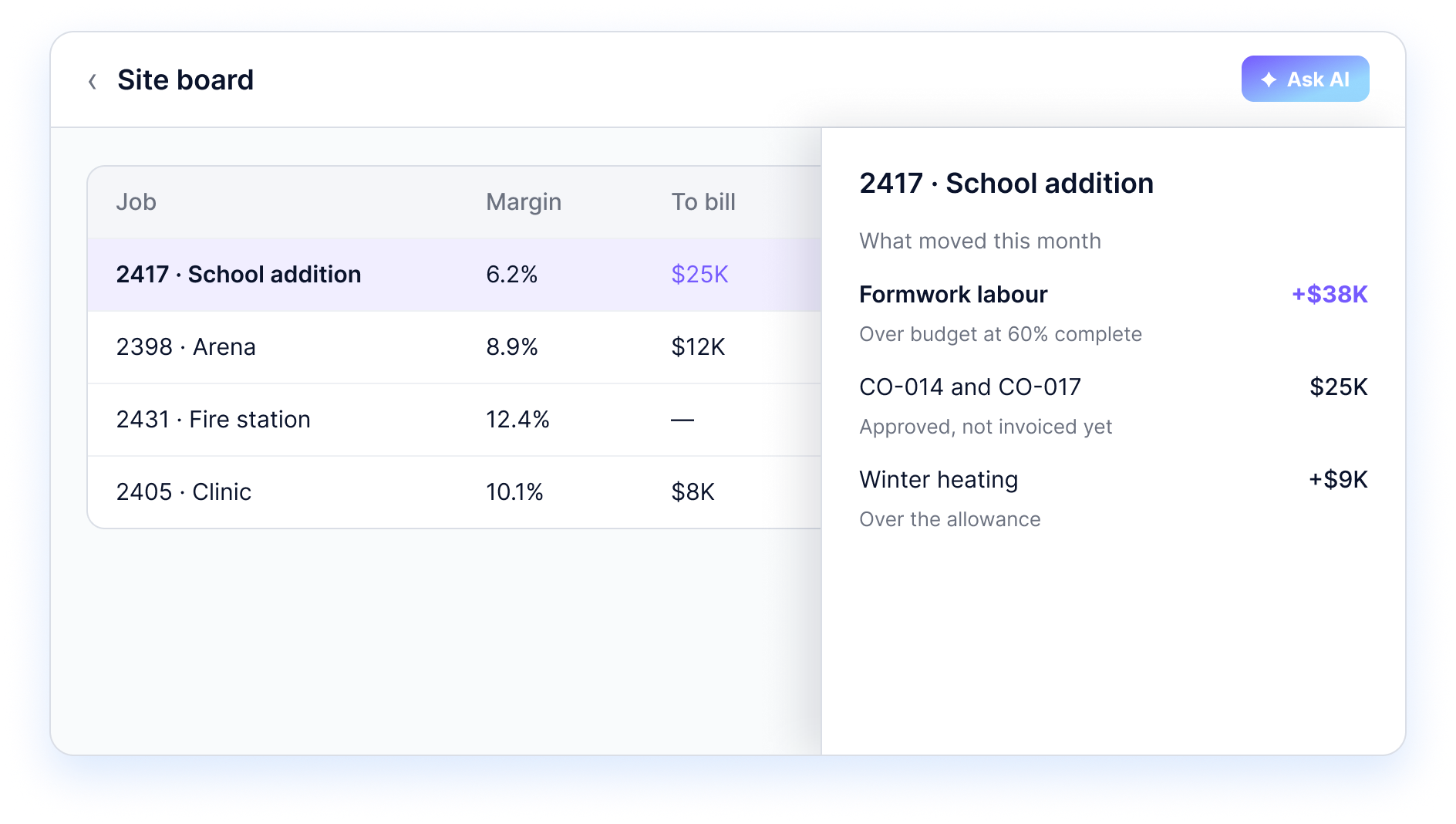
BEEM site board AI Dashboard listing each job's margin and amount to bill, with a slide-over showing what moved on job 2417 this month
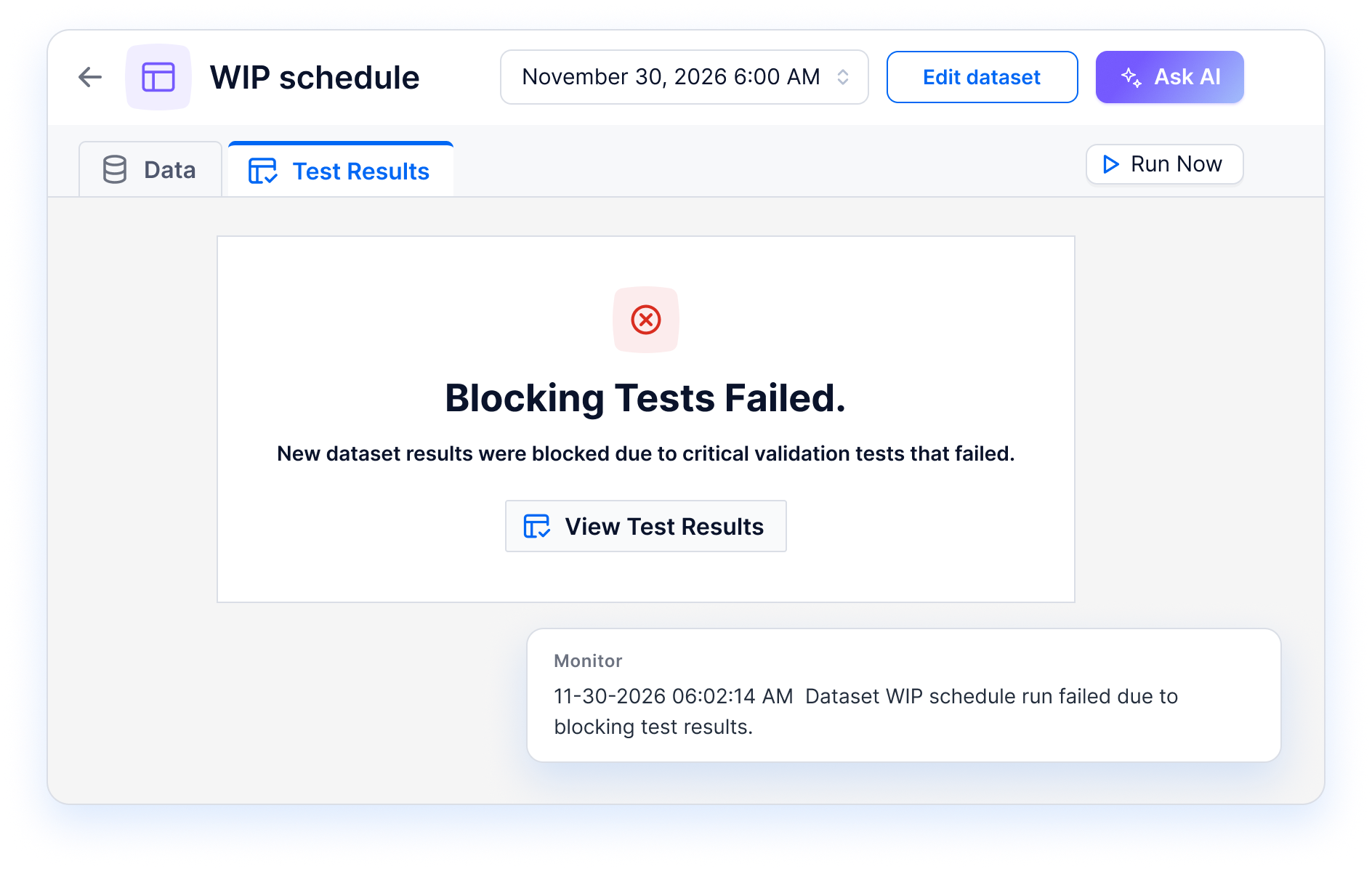
BEEM WIP schedule dataset where blocking tests failed, so the run was held back and logged in Monitor
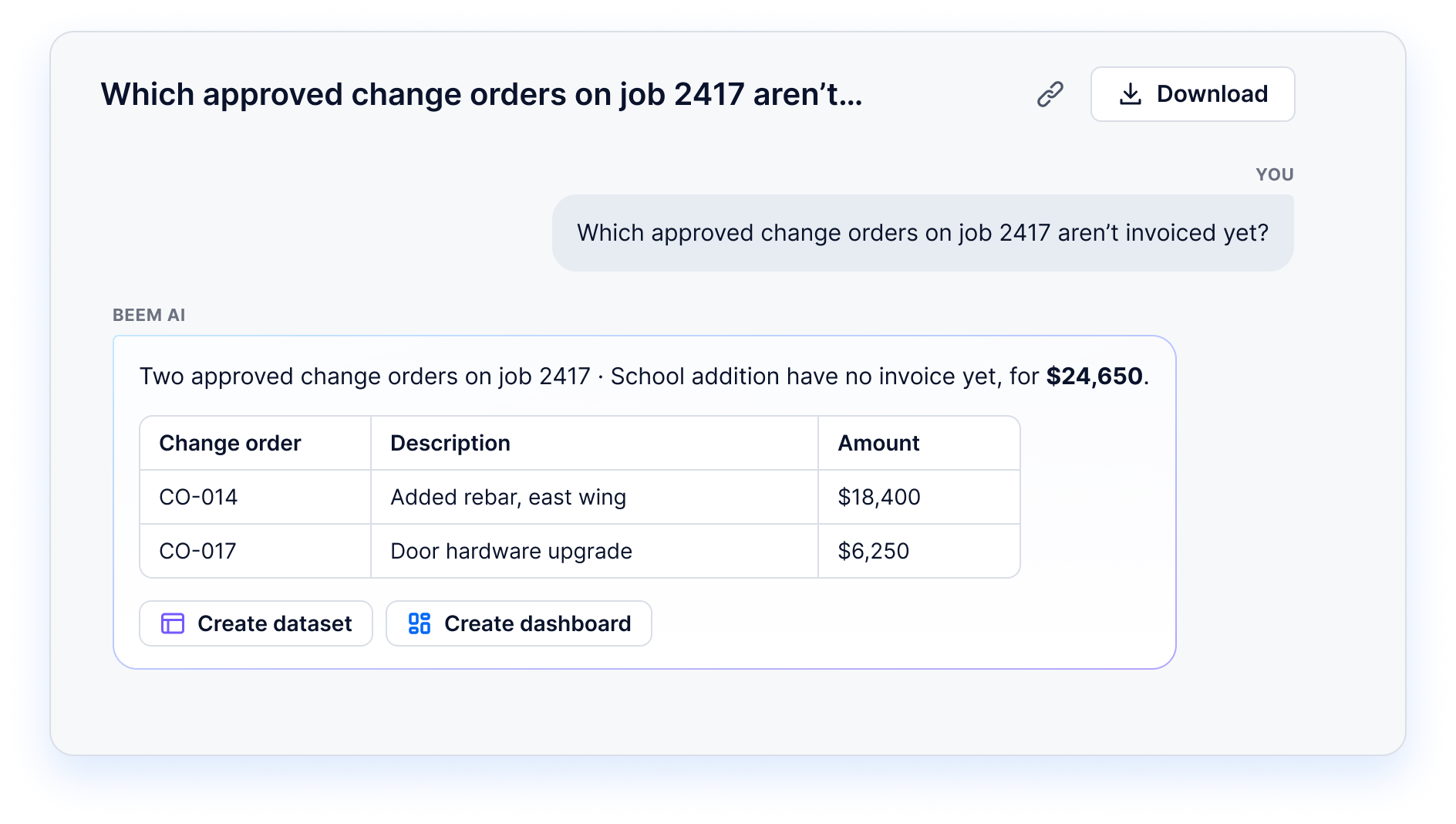
BEEM AI Assistant listing the two approved change orders on job 2417 that aren't invoiced yet, for $24,650
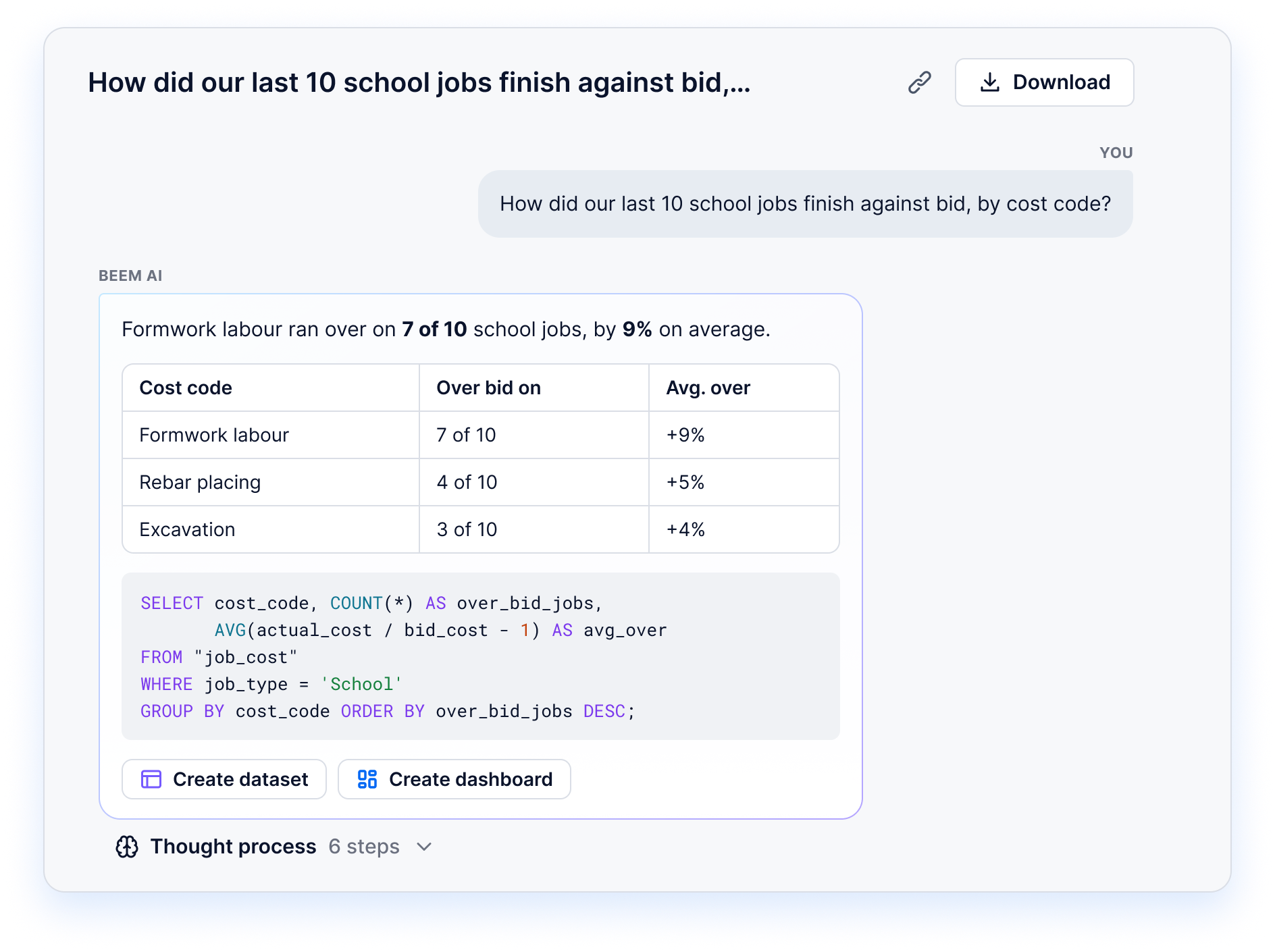
BEEM AI Assistant showing how the last 10 school jobs finished against bid by cost code, with the SQL behind the answer

More use cases

AI use cases in construction: site, forecast, surety

With your jobs in one warehouse, the same numbers answer a PM on site, track margin at completion and prepare you for the surety.

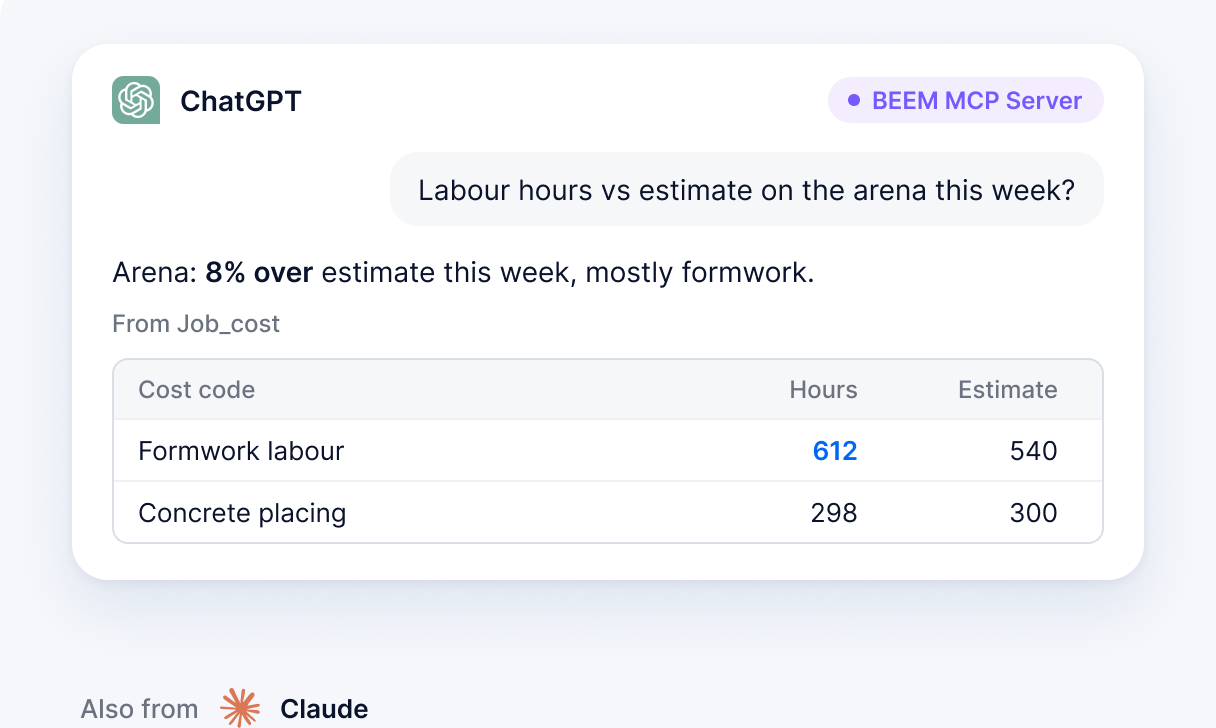
ChatGPT answering a project manager's labour question from BEEM job cost data through the BEEM MCP Server, also available from Claude
This is some text inside of a div block.

Project managers can ask from the truck

With BEEM’s MCP Server, a PM’s ChatGPT or Claude app connects with one URL and their BEEM login, then asks how labour tracks against the bid on any job.

This is some text inside of a div block.

Where does each job land at substantial completion?

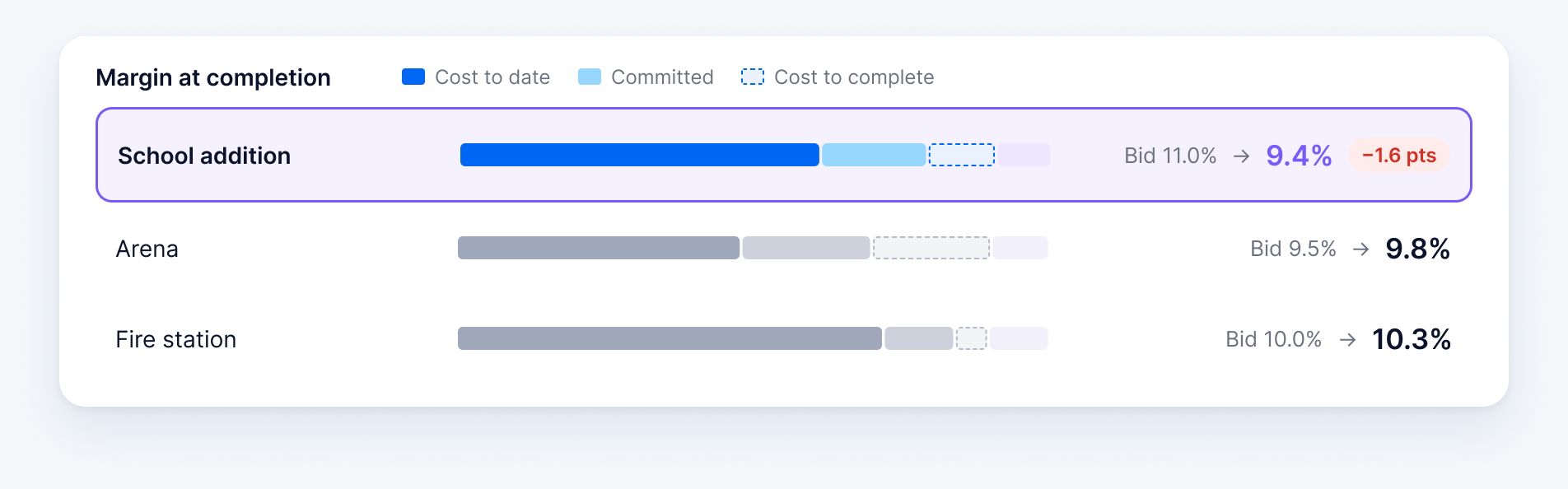
Each month, PMs enter their cost to complete by cost code. BEEM adds it to cost to date and open commitments, and an AI Dashboard tracks each job’s margin at completion, so profit fade shows while there’s still time to act.

AI Dashboard tracking margin at completion per job, with cost to date, committed and cost to complete against the bid
This is some text inside of a div block.

Know which jobs the surety will ask about

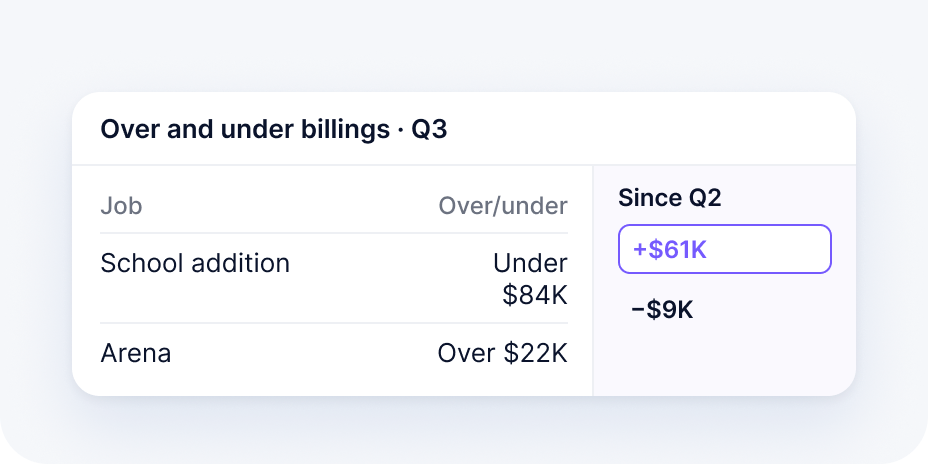
The Over and under billings dashboard shows each job’s underbilling or overbilling from the WIP schedule, with the change since last quarter. Coming to BEEM: a dated WIP package for the surety.

Over and under billings dashboard for Q3 showing each job's underbilling or overbilling and the change since Q2

Results

$1.2M

more margin a year for a construction client that centralized its project data in BEEM

30–50%

better job costing accuracy when contractors combine job cost, field and accounting data in BEEM

“

What I really loved about their approach is that they’re able to simplify for us, as construction experts, what data could bring to our business. We really felt that BEEM wanted to be part of the team.

Frédéric Gauthier

President, MG Construction

40–60%

lower cost than building an in‑house data solution

75%

less time spent on reporting

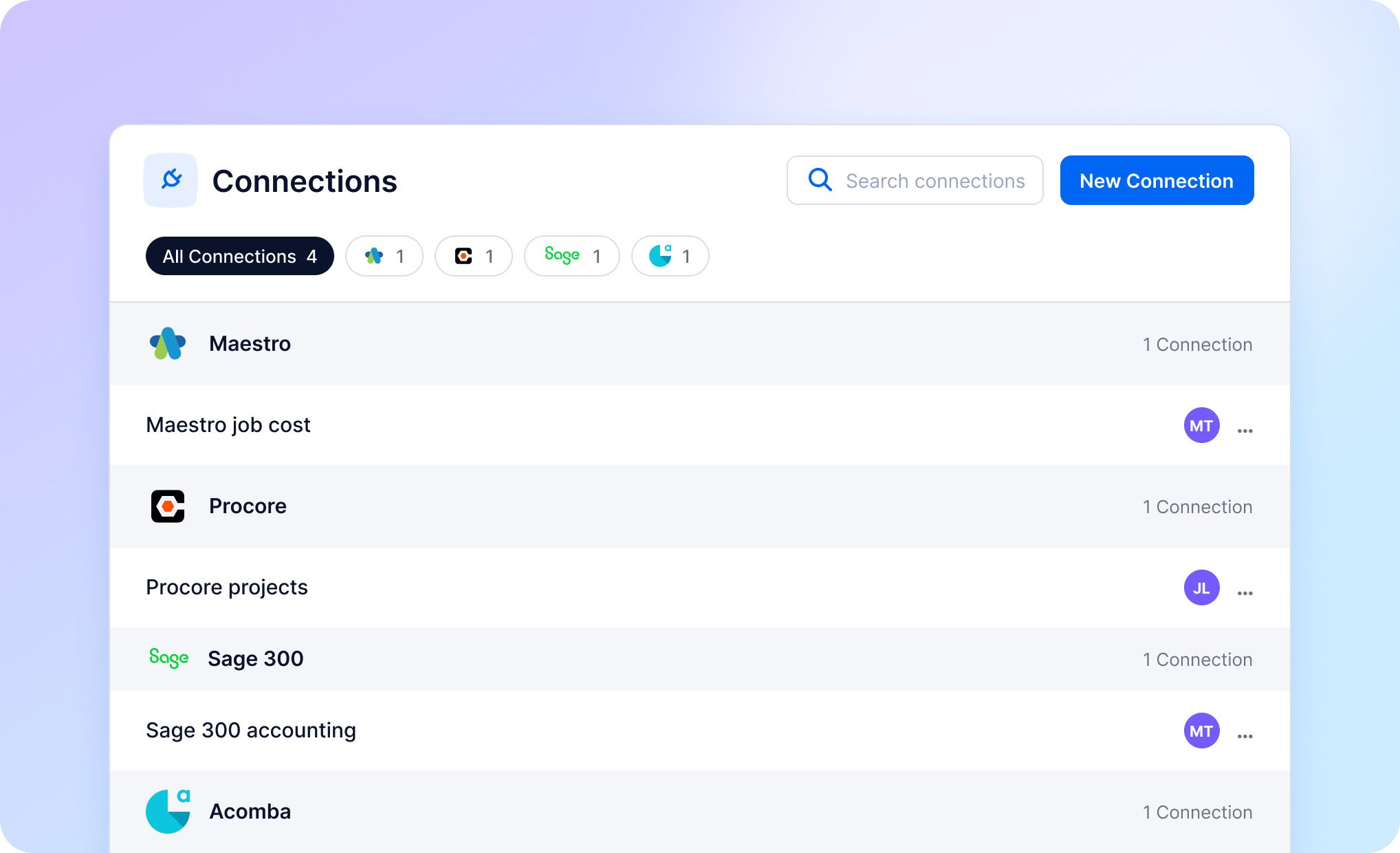
BEEM Connections page with Maestro, Procore, Sage 300 and Acomba connected

Integrations

Construction software integrations: Maestro, Procore, Sage, Acomba

Crews and PMs keep the tools they know. BEEM connects Maestro, Procore, Sage 300, Acomba, QuickBooks and Excel from a library of 750+ connectors. When a system isn’t listed, BEEM builds a custom connector on request.

Power BI can keep reading from the same warehouse, which sits in your own dedicated AWS environment.

AWS logo

Governance

Your controller chooses the job data the AI Assistant reads

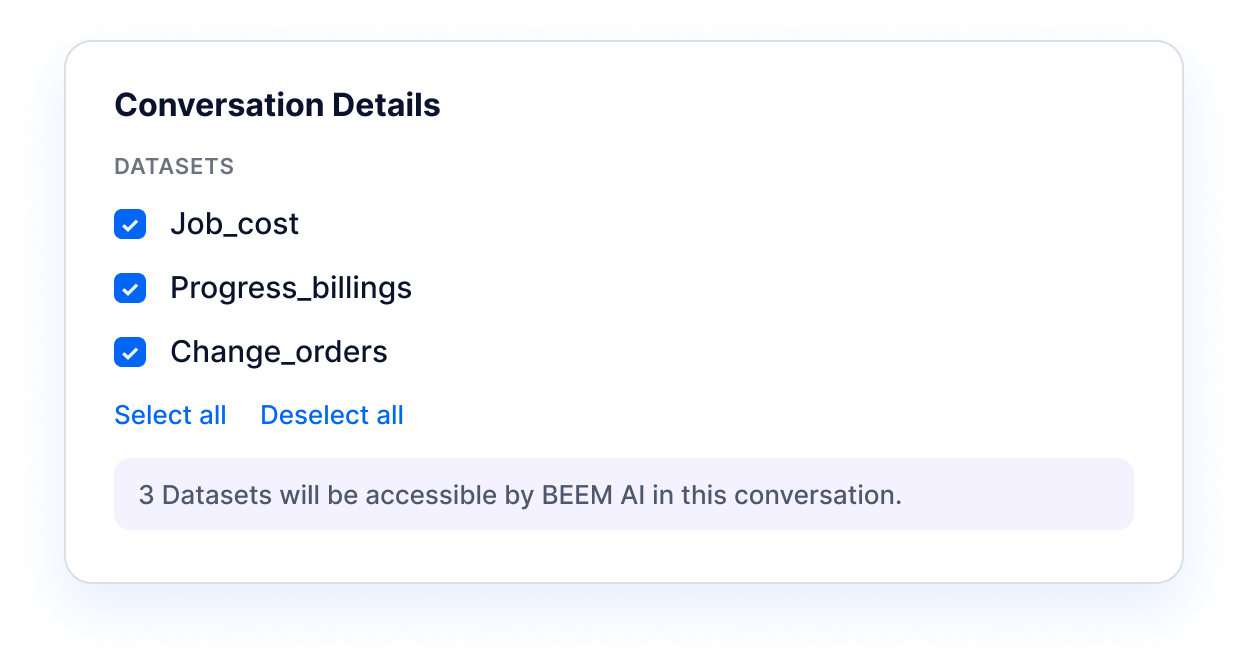
AI Assistant conversation details with Job_cost, Progress_billings and Change_orders datasets selected

The AI Assistant answers only from datasets marked searchable by BEEM AI, and each conversation can narrow that list. Mark job cost, billings and change orders, and leave payroll out.

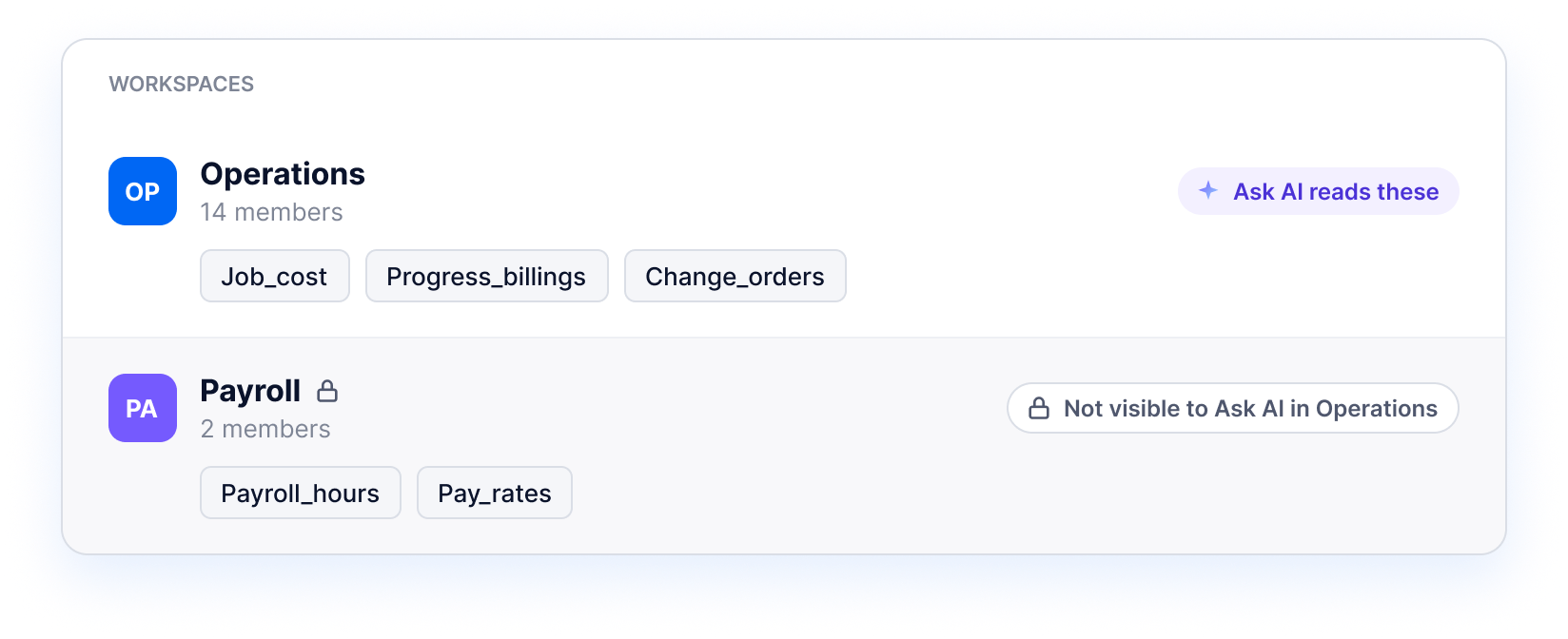
BEEM workspaces: Operations datasets readable by Ask AI, and a separate Payroll workspace not visible to Ask AI in Operations

Ask AI on a dashboard reads every dataset in its workspace, so payroll gets a workspace of its own. Monitor logs every source sync and dataset run with its test results, and BEEM is PIPEDA and GDPR compliant.

Getting started

Getting started: a site board on your own jobs in 2 weeks

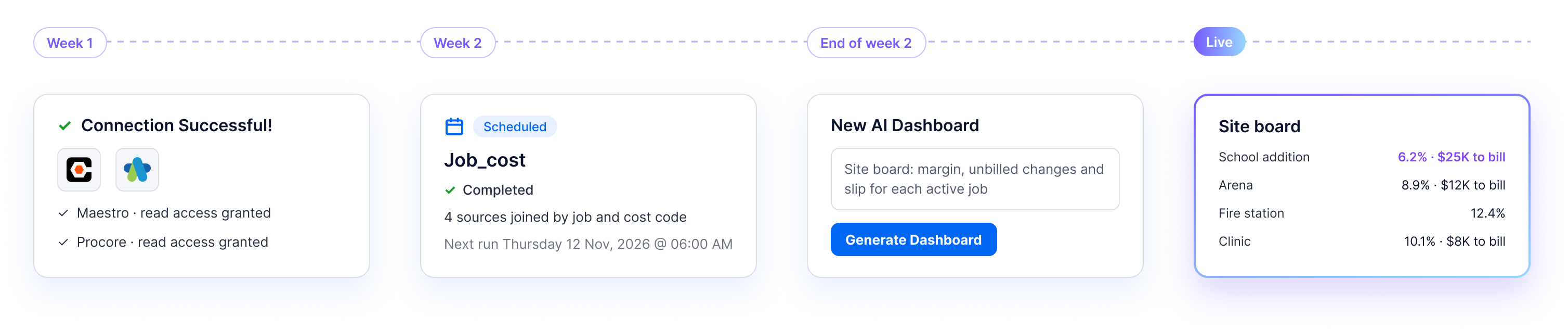
Week one goes to connections, as IT grants read access to Maestro, Procore, estimating and timesheets.

In week two, BEEM’s data team maps estimating codes to accounting codes. Then an AI Dashboard builds the first site board.

This is some text inside of a div block.
  • A job cost system with an API or database
  • Twelve months of history and a few closed jobs
  • One person who defines committed cost
Week 1 connections succeed, week 2 the Job_cost dataset runs, end of week 2 an AI Dashboard is generated, then the site board goes live

Questions contractors ask about AI in construction

FAQ

How is AI used in construction?

On site, AI shows up in cameras, drones and scheduling tools. In the office, it answers questions about job cost, billing and bids. BEEM covers the office side, with an AI Assistant that reads your own connected job cost data.

Can we use ChatGPT or Claude with our job cost data?

Yes. BEEM’s MCP Server lets ChatGPT or Claude connect to your BEEM workspace with one URL and a BEEM login. They read the same datasets as your dashboards, so nobody pastes exports into a chat.

Will project managers actually use it?

PMs use it when it answers their own questions fast. They ask in plain language, such as how labour tracks against the bid on a job this week, and get a written answer with the table behind it, from the office or from the truck.

Can it predict a project’s final margin?

BEEM shows each job’s margin at completion from cost to date, open commitments and the cost to complete your PMs enter each month. Tracked month over month, it shows profit fade while there is still time to act. It is only as good as the cost to complete behind it.

Which datasets can the AI Assistant read?

The AI Assistant reads the datasets marked searchable by BEEM AI in your workspace, and each conversation can narrow that list. Ask AI on a dashboard can read every dataset in its workspace, so keep sensitive data such as payroll in a workspace of its own.

Where does our project data live?

In your own dedicated BEEM environment on AWS, separate from other customers. BEEM is PIPEDA and GDPR compliant.

We already use BEEM dashboards. What changes with AI?

Your datasets and dashboards stay as they are. The AI Assistant answers questions from the same datasets, AI Dashboards build or change a dashboard from a description, and the MCP Server opens the same data to ChatGPT and Claude.

How long before we see our own jobs in BEEM?

First dashboards can be live in as little as 2 weeks. Week one goes to connecting Maestro, Procore and your accounting system. In week two, codes are mapped and an AI Dashboard builds the first site board.

What does BEEM cost?

Pricing depends on the systems you connect and how much of the build you hand to BEEM’s data team, which is priced separately. Companies working with BEEM report 40–60% lower cost than building an in-house data solution. Book a demo for a quote.