AI in finance for a shorter close and a clearer cash runway

Your ledger sits in QuickBooks or Sage and the budget lives in Excel, so the answer to "where do we stand" takes a week of exports.

BEEM joins those systems into one set of numbers that ties out, and your team questions it in plain language. First dashboards run on your own data in as little as 2 weeks.

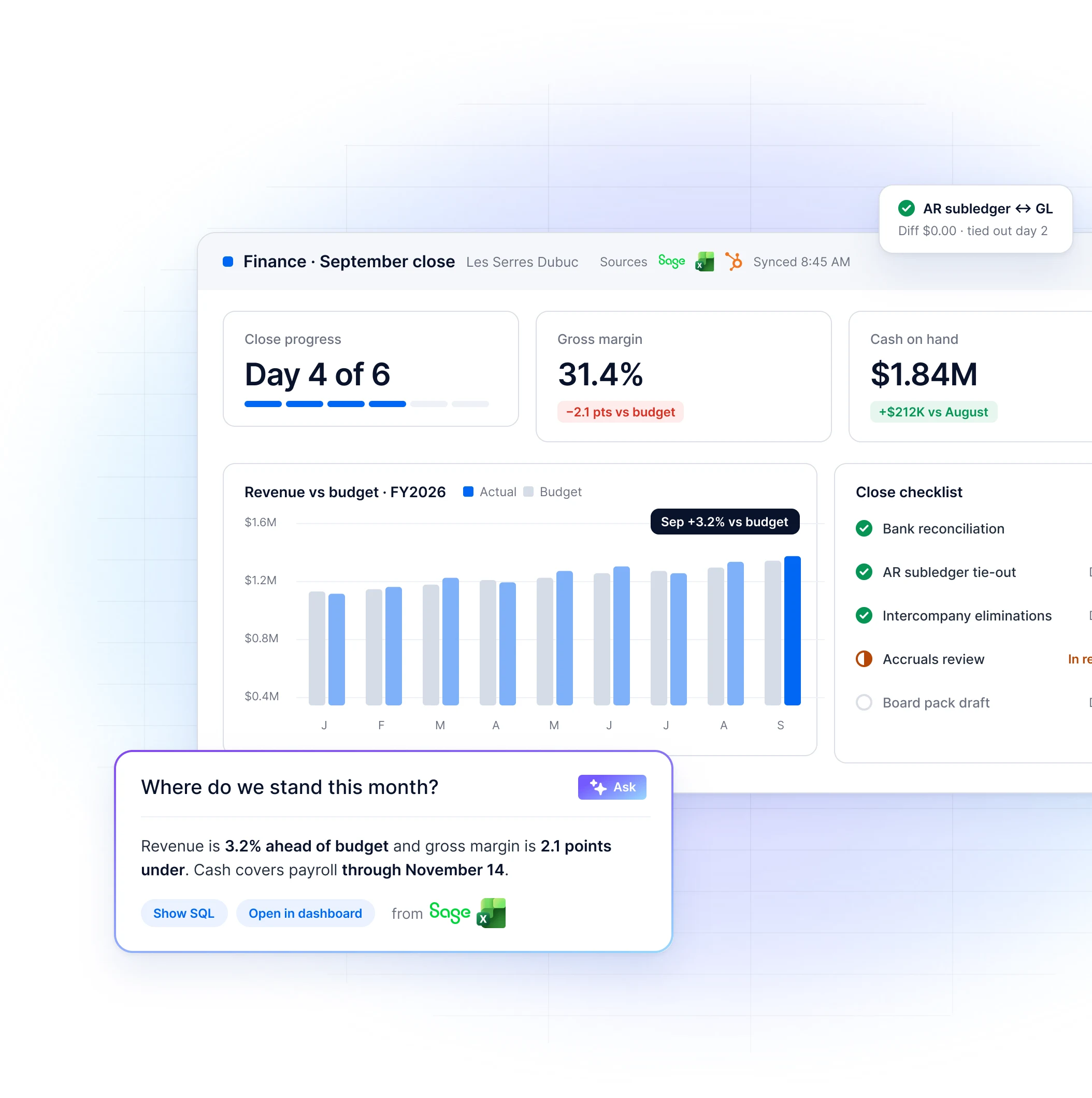
BEEM AI Dashboard for the September close showing close progress at day 4 of 6, gross margin at 31.4%, cash on hand at $1.84M, revenue versus budget for FY2026 and a close checklist, with an AR subledger to GL tie-out card and the AI assistant answering Where do we stand this month? from Sage and Excel data

Companies that trust us

Overview

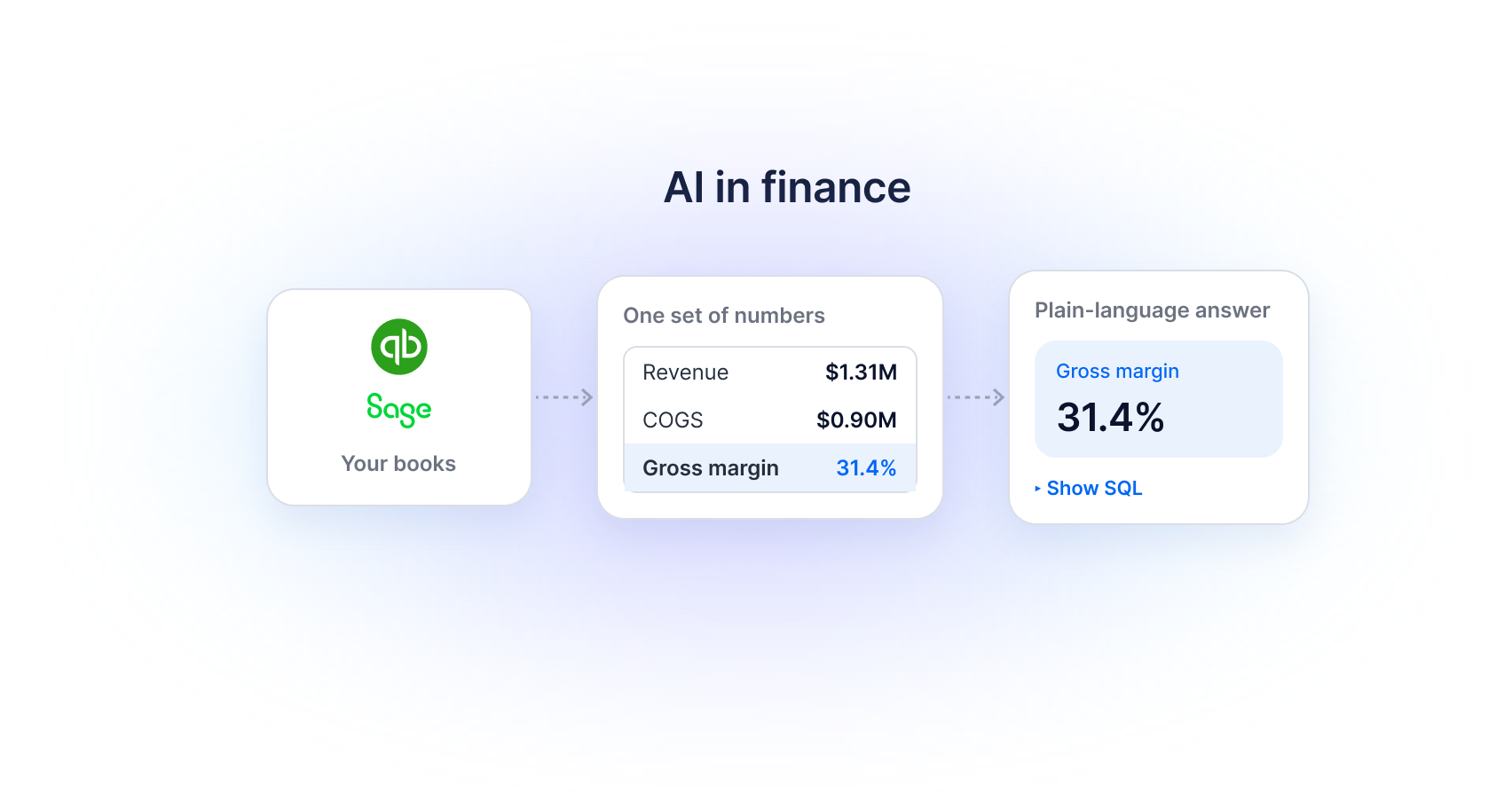
AI in finance: your books in QuickBooks and Sage flow into one set of numbers (revenue $1.31M, COGS $0.90M, gross margin 31.4%), which becomes a plain-language answer showing gross margin 31.4% with the SQL one click away

What AI in finance means for a mid‑market finance team

AI in finance is the use of an AI assistant and generated dashboards to answer the recurring questions about cash, margin and variance from data already in the books.

BEEM is a managed data platform that connects the accounting system, the CRM and the budget files into clean tables. Controllers then ask questions in plain language, and every answer shows the SQL that produced it.

The problem

Why does the board pack
still take four days?

Day three of the close, the ledger export is in and the budget file still carries last year's cost centres.

Month-end close · September

Day 1

Day 2

Day 3

Day 4

Day 5

Day 6

Sage
HubSpot
Excel

Exports and tie-outs

4 days

Accruals

Analysis

Board due

Today

4 days moving numbers between files

½ day reading them

Use cases

Finance dashboards and answers for every week of the month

Every example below runs on data you already have, grouped the way the month runs: close week, the weeks between closes and board season.

None of it needs a data scientist on staff.

Close week

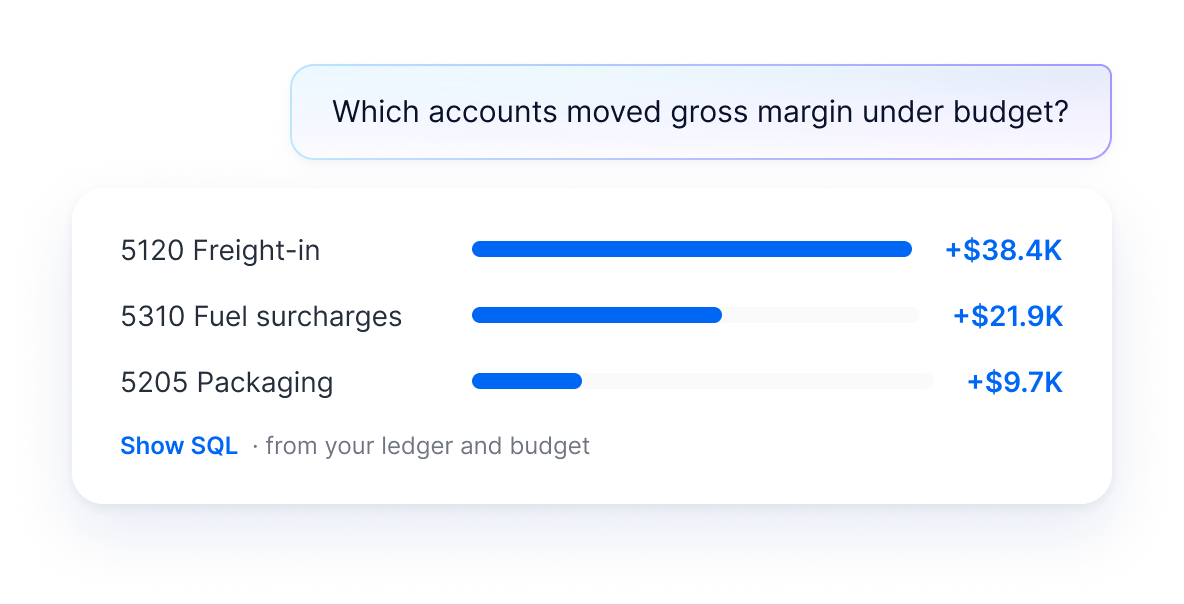
Which account moved gross margin two points under budget?

Ask in plain language and the AI assistant runs the query on the ledger and the budget, then returns the variance by account and department.

The SQL stays visible for whoever signs off.

A question, “Which accounts moved gross margin under budget?”, answered with variance bars for 5120 Freight-in (+$38.4K), 5310 Fuel surcharges (+$21.9K) and 5205 Packaging (+$9.7K), with a Show SQL link

Close week

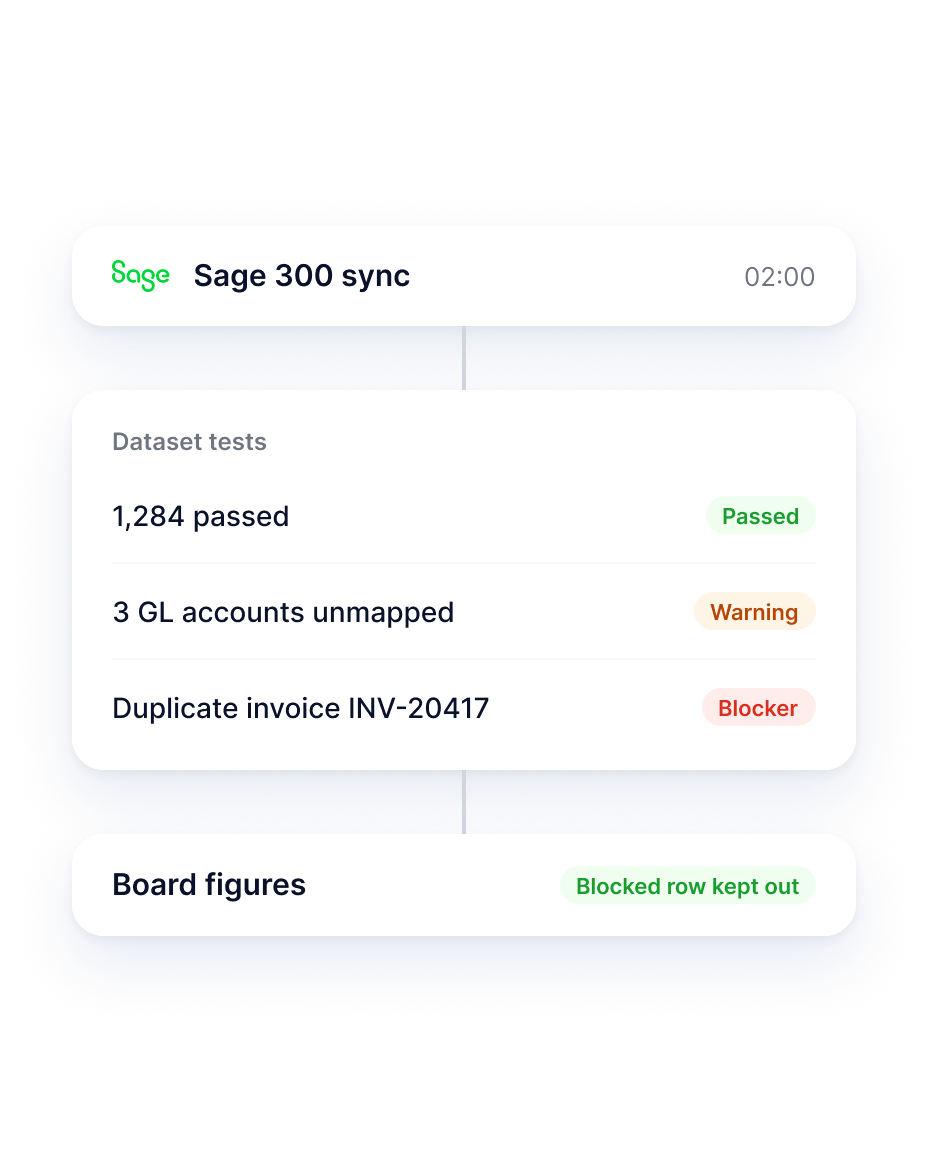
What the overnight tests catch before the tie-out

Dataset tests run on every refresh and flag a duplicate invoice number or an unmapped GL account as a warning or a blocker.

Blockers keep bad rows out of the figures your board will read.

A Sage 300 sync at 02:00 feeds dataset tests: 1,284 passed, 3 GL accounts unmapped flagged as a warning, duplicate invoice INV-20417 flagged as a blocker; the board figures keep the blocked row out

Between closes

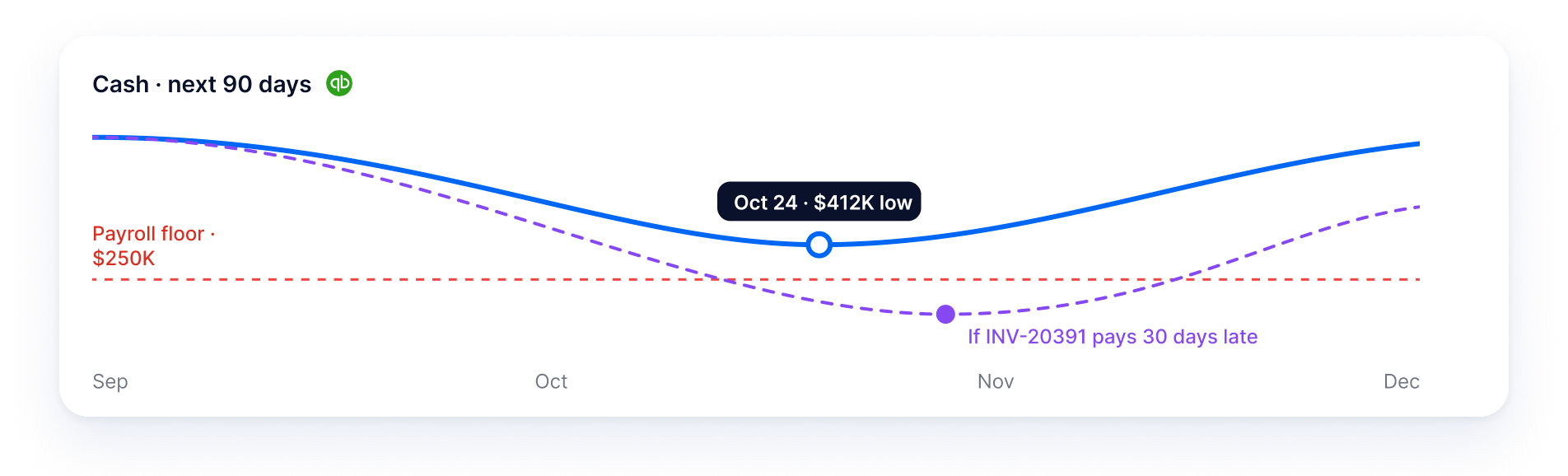
See where cash bottoms out before payroll week

Receivables, payables and cash on hand roll into one 90-day view, projected by the forecasting built into the platform on AWS.

Push a large receivable out 30 days and watch the low point move.

Cash over the next 90 days from QuickBooks: the projected line dips to an Oct 24 low of $412K above a $250K payroll floor, and a dashed scenario shows the low point if INV-20391 pays 30 days late

Between closes

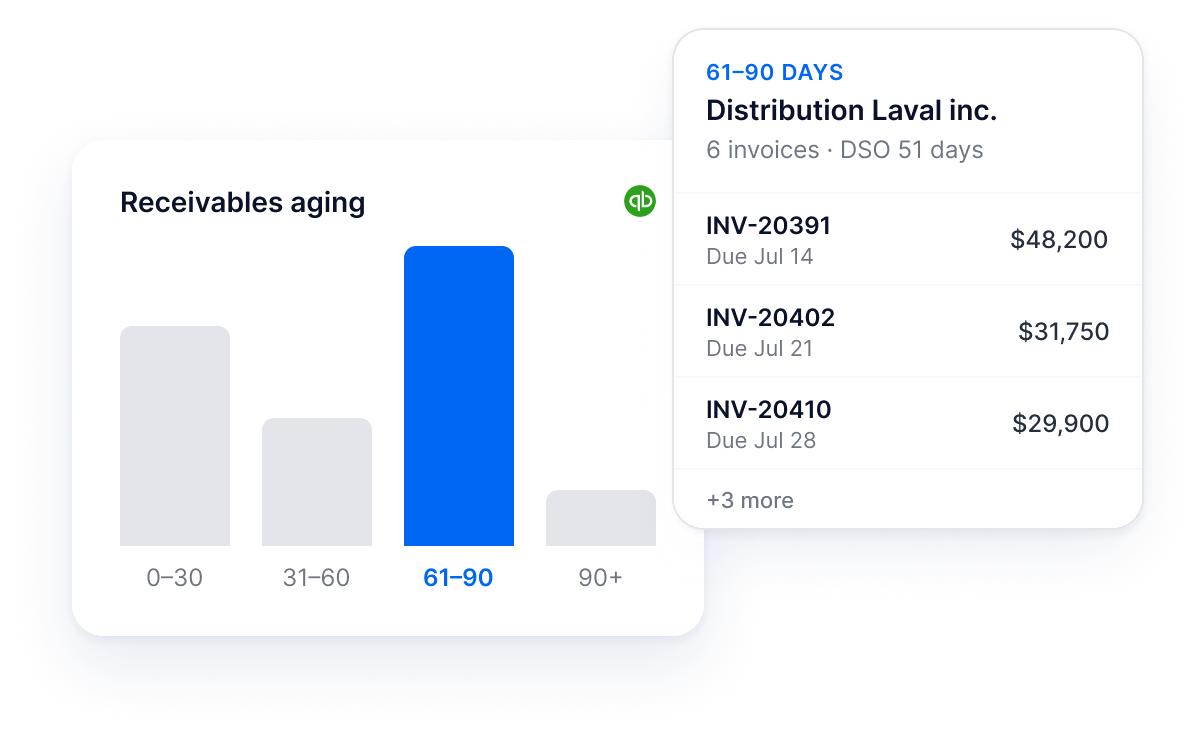
Every aging bucket opens to the invoices inside it

Click the 61-90 day bucket and a side panel lists the invoices, customers and due dates behind that total.

DSO turns into a call list for the receivables clerk instead of a number to defend.

A receivables aging chart from QuickBooks with the 61–90 day bucket selected, opening a side panel for Distribution Laval inc. that lists invoices INV-20391, INV-20402 and INV-20410 with due dates and amounts

Any week

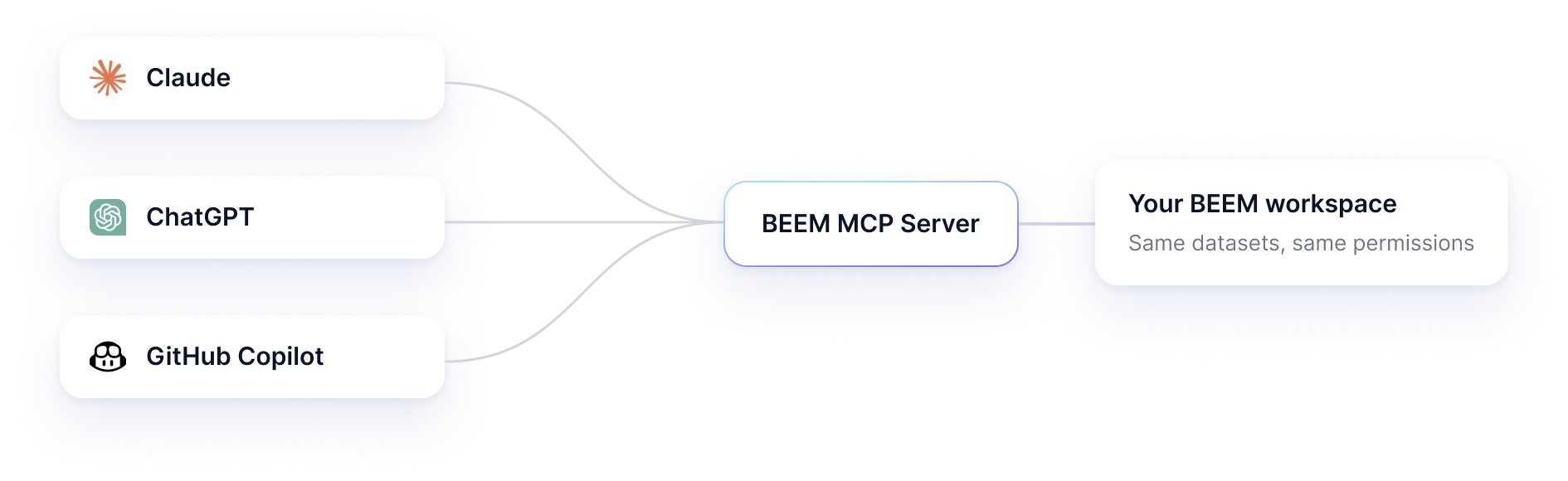
Claude, ChatGPT and other assistants can query the same numbers

Through BEEM's MCP Server, the assistant your team already uses connects to the workspace with one URL and an existing BEEM login.

Permissions follow each person's BEEM account.

Claude, ChatGPT and GitHub Copilot connect through the BEEM MCP Server to your BEEM workspace, with the same datasets and the same permissions

Board season

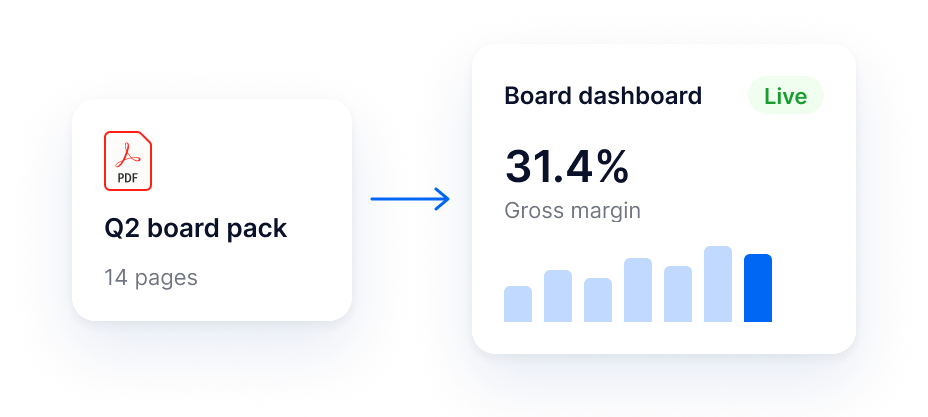
Turning last quarter's board pack into a live dashboard

Attach the board pack PDF from last quarter and an AI Dashboard rebuilds its pages on your connected data.

Refine it by chatting, and version history takes you back when an edit misses.

A 14-page Q2 board pack PDF becomes a live board dashboard showing a 31.4% gross margin and a bar chart

Results

75%less reporting time for finance teams on automated dashboards

Reported by finance teams using automated dashboards

Hours on the monthly reporting cycle

Manual assembly

100%

Automated dashboards

25%

Three quarters of the cycle back to analysis

“This collaboration allows us to focus our efforts in the right places. BEEM handles data connection and transformation, while we guide clients in identifying their performance indicators.”

Maryse Corriveau

Senior Manager, BI, Demers Beaulne

15+ hours

a week freed from manual reporting

As little as 2 weeks

to first live dashboards

Integrations

QuickBooks, Sage, Acomba and the budget workbook, kept in sync

BEEM reaches your accounting package through 750+ pre‑built connectors, along with the CRM where bookings live and the payroll export you reconcile every month.

Spreadsheets your team still owns, like the budget or the capex plan, arrive as scheduled exports. Power BI can keep reading the same clean tables.

Accounting and ERP

The general ledger

GL detail, AR, AP, invoices

Synced 6:02 AM

QuickBooks
Sage
Acomba
SAP

CRM

Where bookings live

Bookings, pipeline, renewals

Synced 6:10 AM

HubSpot
Salesforce

Spreadsheets

What finance still owns

Budget_2026.xlsx, capex plan, payroll export

Export scheduled daily

Microsoft Excel
Google Sheets

Reporting

Keeps working on top

Reads the same clean tables

Live connection

Power BI

One set of numbers in BEEM

750+ pre‑built connectors, plus scheduled file exports for systems without an API

See all integrations  →

Security & governance

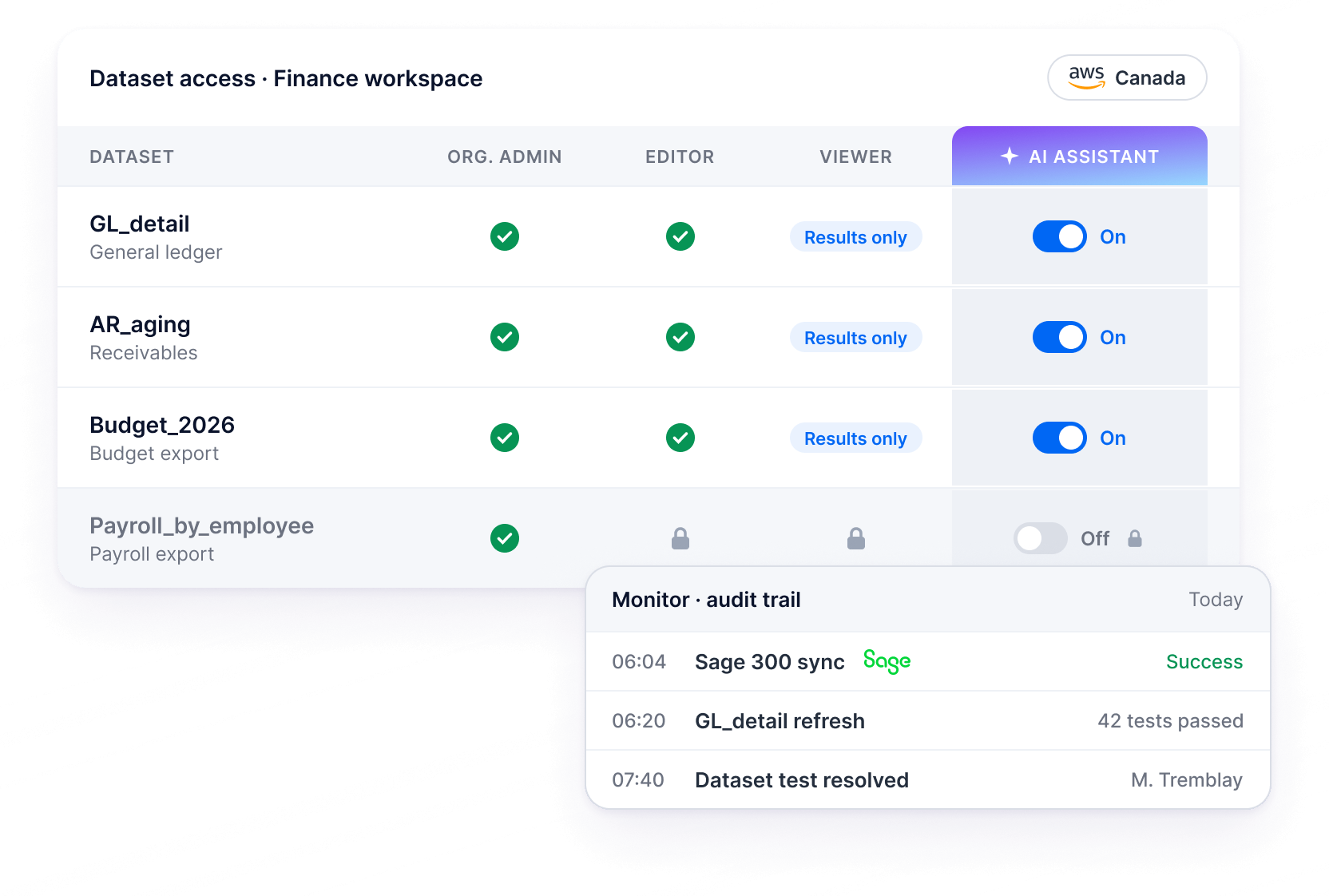
The controller decides what the AI assistant can read

Payroll can stay out of scope while receivables are in, because the assistant only reaches datasets someone has switched on for AI.

Organization Admin, Editor and Viewer roles apply per workspace, and a board member can see a result without the query behind it. Monitor keeps the audit trail of every sync, refresh and test.

The platform runs in a dedicated AWS environment in Canada with the AI on AWS Bedrock, under SOC2 processes and PIPEDA and GDPR compliance.

SOC2 processes

PIPEDA

GDPR

AI on AWS Bedrock

BEEM dataset access matrix for the Finance workspace: GL_detail, AR_aging and Budget_2026 are switched on for the AI assistant while Payroll_by_employee stays off, with a Monitor audit trail of today's Sage 300 sync, GL_detail refresh and resolved dataset test

Getting started

Getting your books connected and a first dashboard live

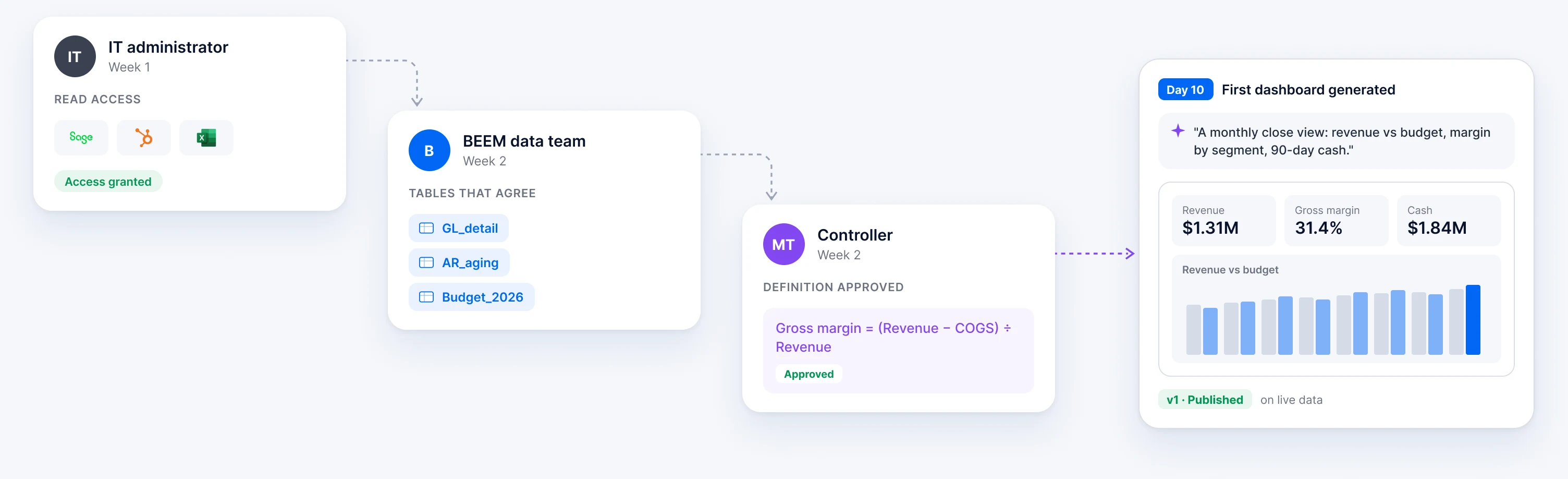
Week one goes to connections, with IT granting access to the accounting system, the CRM and the scheduled exports.

In week two, BEEM's data team can shape accounts, budgets and billing into tables that agree, while your controller reviews the definitions rather than the SQL. Then you describe the first dashboard and the AI builds it on live data.

What you need

An accounting package with an API or database

About twelve months of history

One person who owns the definitions of revenue and gross margin

Handoff from week 1 to day 10: the IT administrator grants read access to Sage 300, HubSpot and Excel in week 1; the BEEM data team shapes GL_detail, AR_aging and Budget_2026 tables in week 2; the controller approves the gross margin definition; by day 10 the first dashboard is generated, showing revenue, gross margin, cash and revenue vs budget.
G
Talk to an expert

Questions controllers ask before the first call

FAQ

What is BEEM and how does it work?

BEEM is a managed data platform that connects, transforms, and analyzes your business data with AI-powered insights. The platform integrates data from 700+ sources including accounting systems, CRMs, ERPs, and other business tools, then transforms that data into dashboards and reports you can use right away. Unlike DIY solutions, BEEM handles all the technical work—from data pipelines to infrastructure—so you get insights in days instead of months.

How long does it take to implement BEEM?

BEEM can be implemented in days rather than the months typically required for custom data solutions. The platform's managed service approach means BEEM's team handles connector setup, data transformation, and dashboard creation while you focus on defining your business requirements. Most clients see their first dashboards within the first week.

How is BEEM different from Fivetran or Keboola?

BEEM provides a fully-managed service where experts handle your data infrastructure, while Fivetran and Keboola are self-service platforms requiring technical teams to operate. BEEM includes data transformation, dashboard creation, security management, and ongoing support as part of the service. This makes it more cost-effective for mid-market companies that want enterprise capabilities without hiring specialized data engineers.

What types of data sources can BEEM connect to?

BEEM connects to 700+ data sources including accounting systems (QuickBooks, SAP Business One, Microsoft Dynamics, Acomba), CRMs (Salesforce, HubSpot, Microsoft Dynamics CRM), project management tools, marketing platforms, and custom databases. The platform also develops custom connectors when needed—for example, BEEM built Odoo connectors for specific client requirements.

Do I need a data engineer or analyst on staff to use BEEM?

No. BEEM's managed service model means you don't need technical staff to operate the platform. BEEM's team handles data pipeline setup, transformations, infrastructure management, and security. You work with BEEM to define what insights and reports you need, and they build and maintain everything behind the scenes.

Should I use BEEM or build my own data pipelines?

Building your own data pipelines requires hiring data engineers, purchasing multiple tools, and spending months on implementation and maintenance. BEEM delivers the same capabilities in days with a managed service that includes expertise, infrastructure, and ongoing support. For most mid-market companies, BEEM eliminates the complexity and cost of assembling a custom data stack while providing enterprise-grade capabilities. Choose BEEM if you want to focus on using data rather than managing technical infrastructure.

How much does BEEM cost compared to building an in-house solution?

Building an in-house data stack typically requires hiring data engineers ($120K+ annually), purchasing multiple tools for ETL, storage, and transformation, and ongoing maintenance costs. BEEM's managed service consolidates these expenses into a single subscription that includes infrastructure, expertise, and support. Most mid-market companies save 40-60% compared to the total cost of assembling and maintaining an internal solution.

What is the ROI of using BEEM vs hiring a data team?

Hiring an internal data team typically costs $200K-$400K annually (data engineers, analysts, infrastructure costs), plus 3-6 months for implementation. BEEM provides the same capabilities at a fraction of the cost with a managed service that includes expert resources, infrastructure, and support. Companies typically see ROI within the first quarter through faster decision-making, reduced manual reporting time, and eliminating the need for specialized hires. BEEM clients report saving 40-60% compared to building and maintaining an in-house data solution while getting insights operational in days instead of months.

Can BEEM integrate with Power BI or Tableau?

Yes. BEEM works with your existing BI tools including Power BI, Tableau, and other visualization platforms. BEEM handles the data integration and transformation, then feeds clean, analysis-ready data into your preferred reporting tools. For example, BEEM accelerated SAP data integration into Power BI for clients who wanted to keep using Microsoft's visualization platform while simplifying their data pipeline.

‍

Bring one month-end question to the demo

Pick the question your board asks every month and we will walk through it on real data in the demo, then you decide.

“Why did September’s DSO rise from 44 to 51 days?”