
Definition
A data pipeline is an automated series of steps that moves data from where it is created to where it is used. It pulls data out of the apps and systems a business runs on, processes and cleans it in transit, then loads it into a destination like a data warehouse, a dashboard or an AI model.
The pipeline is the plumbing that keeps that flow running on its own.
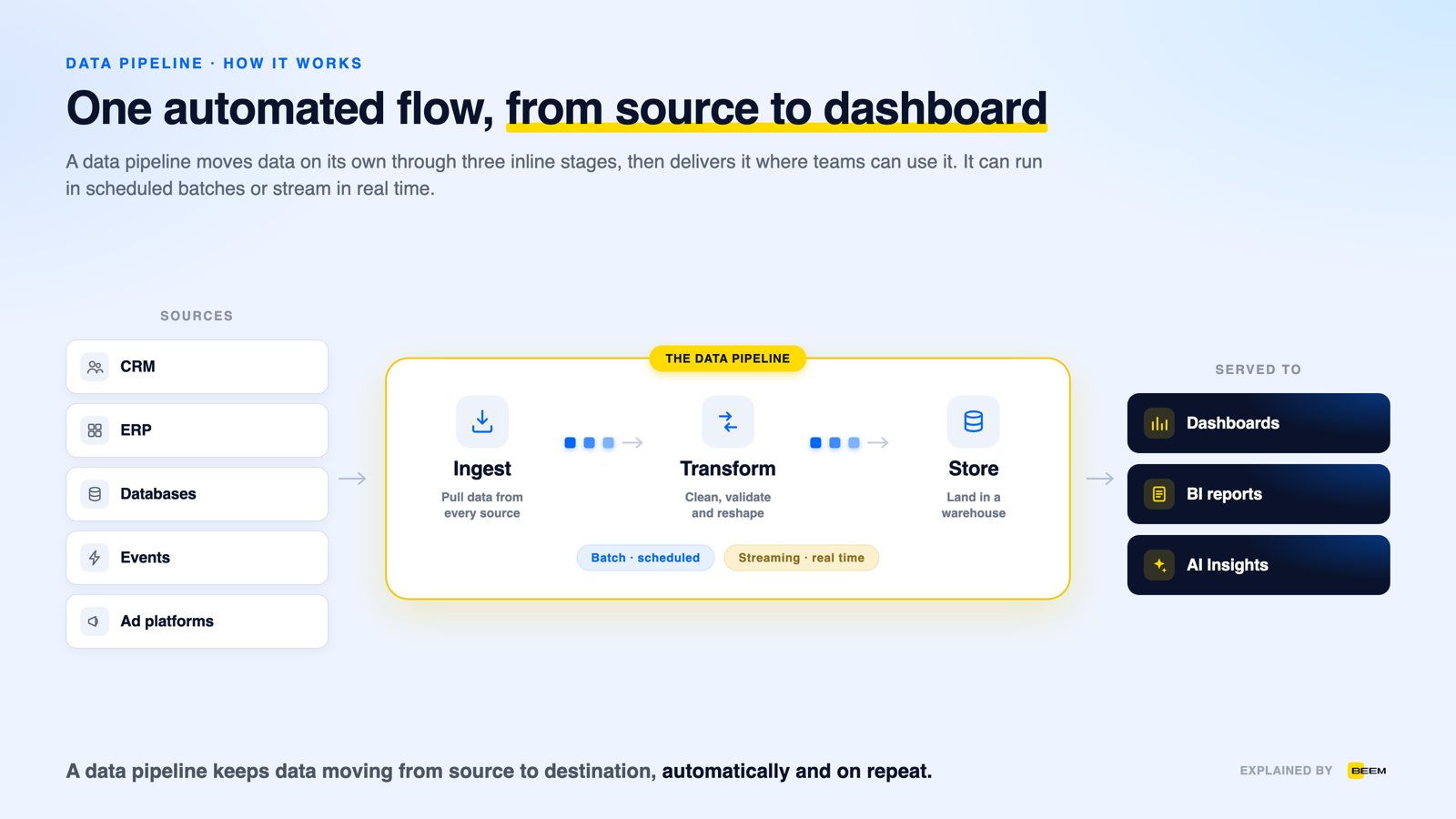
How it works
A data pipeline works by moving data through four stages: ingest, process, store and serve. Each stage hands off to the next, and the whole flow runs on its own, either on a schedule or in real time. Once it is set up, no one has to move files by hand, and the same steps repeat every time new data arrives.
- Ingest — data is pulled from source systems such as a CRM, an ERP, databases, ad platforms and event streams. This first step is where data integration connects each source.
- Process and transform — the pipeline cleans, validates and reshapes the data so it stays consistent. This is where an ETL or ELT step runs.
- Store — the processed data lands in a destination built for analysis, usually a data warehouse or a data lake.
- Serve — dashboards, reports and AI read from that destination, so every team works from fresh, trusted data instead of manual exports.
How it compares
Data pipelines are grouped two ways: by how often they move data, and by when they transform it. The first split is batch versus streaming.
The second split is about order. An ETL pipeline transforms data before loading it, while an ELT pipeline loads raw data first and transforms it inside the warehouse.
It is also worth separating a pipeline from ETL itself. A data pipeline is the broad term for any automated flow that moves data between systems, and ETL is one kind of pipeline, the one that extracts, transforms and loads on a schedule. Every ETL process is a data pipeline, but not every pipeline is ETL: some stream data continuously, and some only move data from one place to another without changing it at all. ETL describes the steps, and a pipeline is the running system those steps live in.
| Type | How it moves data | Best for |
|---|---|---|
| Batch | Scheduled runs, data in chunks | Reporting, daily and hourly loads |
| Streaming | Continuous, record by record | Real-time alerts, live analytics |
When your business needs one
- Dashboards and BI need to read from one clean source instead of exports someone refreshes by hand.
- Events have to be watched as they happen, for fraud checks, alerts or live metrics.
- Data from many apps has to be combined into a single view.
- AI or machine learning models need clean, current data delivered on a regular cadence.
- Data has to move from an old system to a new one in a controlled, repeatable way.
Benefits and limits
- No manual movement — once the pipeline runs, nobody exports, reformats or re-uploads files.
- Repeatable results — the same steps run every time, so the same input always produces the same output.
- Fresher data — scheduled or streaming runs keep the destination close to what the source systems hold.
- Cleaning happens in one place — validation and reshaping live in the pipeline rather than in each report.
- It scales — adding a source or increasing volume is a change to the pipeline, not more work for a person.
- Pipelines break when a source changes: a renamed field or a new API version can stop a run silently.
- They need monitoring, alerting and someone on the hook when a load fails overnight.
- Streaming is meaningfully harder to build and operate than batch, and is often not worth it for reporting.
- A pipeline moves whatever it is given, so poor source data arrives poor unless validation is built in.
- Every added source and transformation is more surface to maintain as the business changes.
- A data pipeline is the automated flow behind every dashboard: ingest, process, store, serve.
- ETL is one kind of pipeline, not a synonym — ETL names the steps, the pipeline is the running system those steps live in.
- Pipelines split by cadence, batch versus streaming, and by order, ETL versus ELT; the common uses are reporting, real-time monitoring, integration, feeding AI models, and migrations.
Frequently Asked Questions
What is a data pipeline in simple terms?
A data pipeline is an automated path that carries data from the systems where it is created to a place where it can be used. Along the way it cleans and reshapes the data, then delivers it to a warehouse, a dashboard or an AI model. Think of it as plumbing that moves data on its own, without anyone copying files by hand.
What is the difference between a data pipeline and ETL?
A data pipeline is the broad term for any automated flow that moves data between systems. ETL is one kind of data pipeline that extracts, transforms and loads data, usually on a schedule. Every ETL process is a data pipeline, but not every pipeline is ETL. Some pipelines stream data or move it without any transformation.
What are the main types of data pipelines?
Data pipelines are grouped two ways. By timing, they are batch, which moves data in scheduled chunks, or streaming, which moves each record as it arrives. By order of steps, they are ETL, which transforms data before loading it, or ELT, which loads raw data first and transforms it inside the warehouse.
What is the difference between a batch and a streaming pipeline?
A batch pipeline moves data on a schedule, gathering records into chunks and loading them at set intervals. It suits reporting and daily loads. A streaming pipeline moves data continuously, one record at a time, as soon as it is created. It suits real-time alerts, fraud checks and live analytics where waiting is not an option.
What is a data pipeline used for?
Data pipelines move data whenever it has to travel without manual work. Common uses are feeding a warehouse for reporting and dashboards, streaming events for real-time monitoring, integrating data from many apps into one view, delivering clean data to AI and machine learning models, and migrating data from an old system to a new one.
Does BEEM build data pipelines?
Yes. BEEM runs managed data pipelines for you, so there is nothing to build or maintain. Its 750+ connectors ingest data from your tools, load it into a built-in warehouse on Amazon Redshift, then feed dashboards and AI Insights as one service. Plans start at $899 per month, and first dashboards land in as little as 2 weeks.
